
PI-Kurve: Cartesian Curve for Fractal Geometry via Parameter Iteration
Loading the math board and drawing, please wait…
In collections
complex-numbers
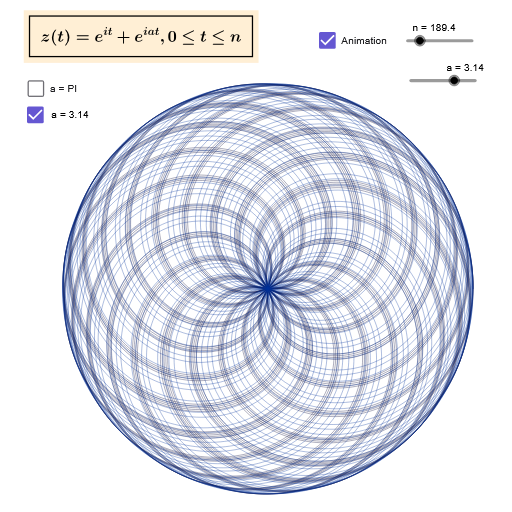
This GeoGebra example generates and visualizes a “PI-Kurve (Pikurve)” by drawing a Cartesian curve that highlights how an iterative or parameter-driven rule shapes the curve’s form. It is designed to demonstrate fractal-geometry style behavior: local structure and repetition emerging from the way the curve is constructed, together with the idea of organizing the construction through parameter sets/partitions. The key mathematical notions include Cartesian curve plotting, fractal geometry intuition, and set/partition-based construction using multiple parameters. From the construction summary, the curve is produced with the command CurveCartesian, using objects such as n (iteration/segment index) and parameters a, b, c, e, along with curve/derived objects like pikurve and akurve. Text objects (Text1, Text2) are used to annotate the curve and important parameters. Suitable for advanced secondary school through undergraduate visualization tasks, especially for lessons on curve graphing, parametric control, and fractal geometry concepts.
GeoGebra Commands & Parameters
CurveCartesian(cos(t) + cos((pi * t)), sin(t) + sin((pi * t)), t, 0, n) → pikurveCurveCartesian(cos(t) + cos((a * t)), sin(t) + sin((a * t)), t, 0, n) → akurve
AI Drawing Prompt Reference
Draw a parametric curve defined by x(t)=cos t+cos(π t), y(t)=sin t+sin(π t) for t ranging from 0 to an integer n, producing a closed loop with many interlaced lobes resembling a spirograph; also plot a second curve using a variable parameter a, given by x(t)=cos t+cos(a t), y(t)=sin t+sin(a t), with the same t range, and display the values of a and n as text labels on the diagram to illustrate the relationship between the π‑based curve and the a‑parameterized curve.
The prompt above was compiled from the original drawing commands and is for reference only.