
Quadratic Equation: Complex Solutions
Loading the math board and drawing, please wait…
In collections
complex-numbers
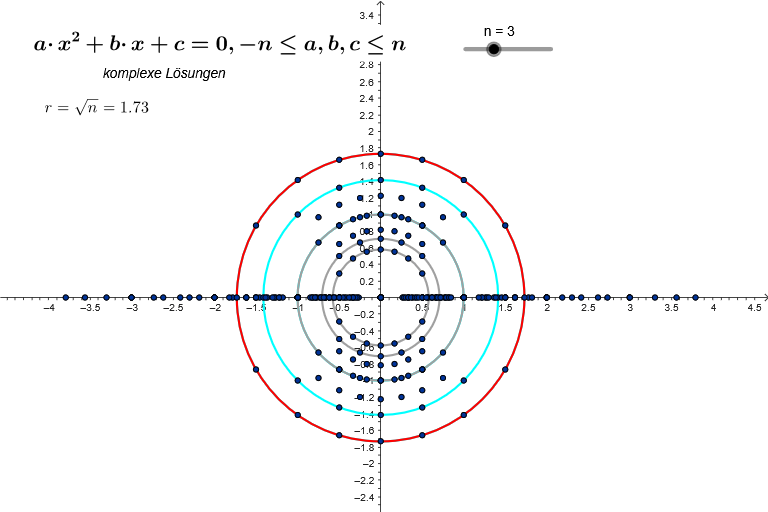
This example demonstrates how to use GeoGebra to solve quadratic equations with complex solutions. It involves core math concepts such as complex numbers, quadratic equations, and coordinate geometry. The construction points include using Flatten, Circle, and Sequence commands to graph the quadratic equation. Suitable for high school math classes and university-level math research.
GeoGebra Commands & Parameters
Flatten(Sequence[Sequence[Sequence[(j, k, l), j, (-n), n], k, (-n), n], l, (-n), n]) → KCircle((0, 0), sqrt(n)) → krSequence(Circle[(0, 0), sqrt(k)], k, 1, n) → C1Sequence(Circle[(0, 0), sqrt(1 / k)], k, 1, n) → C2Sequence(CSolutions[(x(K(j)) * x^(2)) + (y(K(j)) * x) + z(K(j)) = 0, x], j, 1, Length[K]) → L
AI Drawing Prompt Reference
In the coordinate system, draw two families of concentric circles: the first family with radii equal to the square roots of integers from 1 to n, and the second family with radii equal to the square roots of reciprocals from 1/n to 1. Also draw a large circle centered at the origin with radius sqrt(n). These geometric figures together form a visualization demonstrating complex solutions of quadratic equations, where the inner and outer circle families correspond to the coefficients and complex roots of the equations.
The prompt above was compiled from the original drawing commands and is for reference only.