
Hyperbola as Locus in a Triangle
Loading the math board and drawing, please wait…
In collections
Besondere Punkte/Special Points
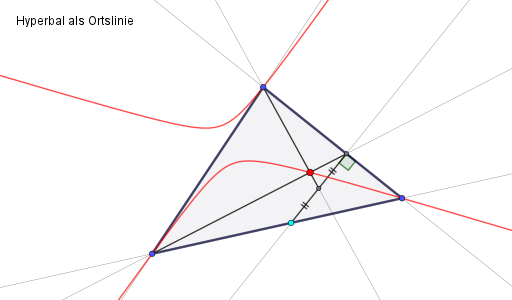
This example demonstrates how to draw a hyperbola's locus within a triangle. The key mathematical concepts involved are geometry and algebra. The construction points include using GeoGebra commands Polygon, Line, Point, OrthogonalLine, Intersect, Angle, Segment, Midpoint, and Locus. Suitable for middle school mathematics and geometry.
GeoGebra Commands & Parameters
Polygon(A, B, C) → d1, c, a, bLine(A, B) → fLine(B, C) → gLine(A, C) → hPoint(f) → DOrthogonalLine(D, g) → iIntersect(i, g) → EAngle(D, E, B) → αSegment(D, E) → jSegment(A, E) → kMidpoint(E, D) → FSegment(D, F) → lSegment(F, E) → mSegment(C, F) → nLine(C, F) → pLine(A, E) → qIntersect(p, q) → GLocus(G, D) → Ortslinie1
AI Drawing Prompt Reference
Draw a hyperbola's locus inside a triangle. Start by sketching the three sides of the triangle, then take a point on one side, draw a perpendicular line, and find the intersection point. Connect these points and intersections to form segments and a smaller triangle. Locate the midpoint of a segment, and finally, draw a locus centered at one point passing through another to create the hyperbola's path.
The prompt above was compiled from the original drawing commands and is for reference only.