
Constructing a 9-Point Conic (9-Punkte-Kegelschnitt)
Loading the math board and drawing, please wait…
In collections
Besondere Punkte/Special Points
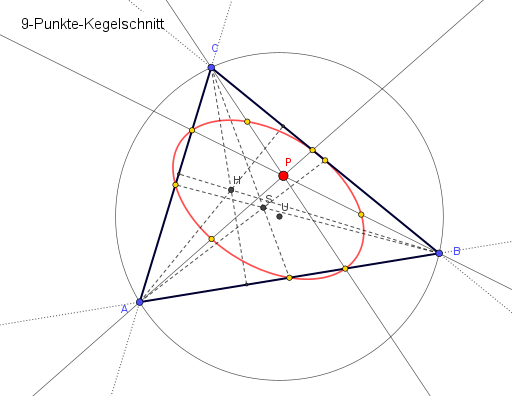
This example demonstrates how to construct a conic (often an ellipse) from a configuration based on nine key points, highlighting the geometric relationships among triangles, lines, and the resulting conic. It centers on core concepts such as the defining properties of a conic, how a conic can be determined by constraints from points/lines (via the Conic tool), and the use of classical constructions—midpoints, intersections, and perpendicular lines—to generate the needed data. Construction workflow in GeoGebra: Polygon to form the reference triangle, Line and Segment to create auxiliary lines and segments, Midpoint to obtain edge midpoints, Intersect to compute intersection points, Conic to build the target conic from the constructed constraints, OrthogonalLine to add perpendicular relations, and Circle with Center to create circle-based intermediate structure. The model uses numerous labeled points and helper elements (e.g., A,B,C and additional points like D–O, plus variables such as d,i,j,k,l,m,n) to drive the final conic construction. Suitable for high-school geometry enrichment, contest preparation, and classroom demonstrations focused on “determining curves from point/line data” using dynamic geometric construction.
GeoGebra Commands & Parameters
Polygon(A, B, C) → d1, c, a, bLine(A, P) → fLine(B, P) → gLine(P, C) → hMidpoint(P, A) → DMidpoint(P, B) → EMidpoint(P, C) → FMidpoint(b) → GMidpoint(a) → H_{1}Midpoint(c) → IIntersect(f, a) → JIntersect(g, b) → KIntersect(h, c) → LConic(D, L, I, E, F) → dLine(A, B) → iLine(B, C) → jLine(A, C) → kOrthogonalLine(A, j) → lOrthogonalLine(B, k) → mOrthogonalLine(C, i) → nIntersect(n, i) → MIntersect(l, j) → NIntersect(m, k) → OSegment(C, M) → pSegment(A, N) → qSegment(B, O) → rIntersect(l, m) → HSegment(C, I) → sSegment(A, H_{1}) → tSegment(B, G) → eIntersect(s, t) → SCircle(A, B, C) → c_1Center(c_1) → U
AI Drawing Prompt Reference
Draw a reference triangle using three given vertices, then choose an additional point to form three auxiliary lines through each vertex. Compute the midpoints on the segments from the auxiliary point to each vertex and also the midpoints of the triangle’s sides. Find several intersection points from the auxiliary lines and side-midpoint lines to serve as constraint points. Construct three side direction lines and add perpendicular relations from each vertex to the opposite side-direction line, then take intersections of the corresponding perpendicular lines to obtain further constraint points. Use the constructed midpoints and intersection points as defining constraints to draw a conic (typically an ellipse) and include a circle through the three triangle vertices together with its center to show the related structure.
The prompt above was compiled from the original drawing commands and is for reference only.