
Geometric construction of the Euler line (Eulergerade) in a triangle
Loading the math board and drawing, please wait…
In collections
Besondere Punkte/Special Points
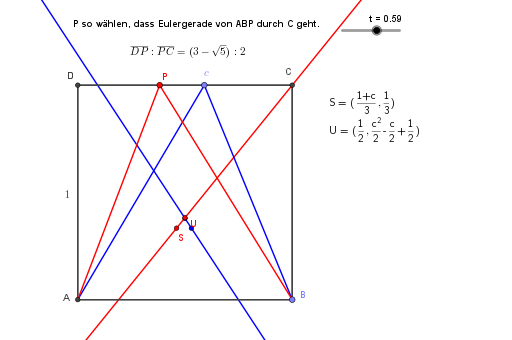
This example demonstrates how to construct the Euler line (Eulergerade) for a given triangle and visualize the resulting collinearity of important triangle centers. The core mathematics includes triangle geometry centered on the circumcircle (Umkreis) and the relationships among key points such as the centroid and orthocenter, culminating in the geometric definition and property of the Euler line. Construction highlights: using GeoGebra commands Intersect, Point, Polygon, Segment, and Eulergerade. The workflow first builds the triangle configuration via vertices and auxiliary geometric objects (e.g., A, B, C, D, E, P, Vieleck1, t, L and several auxiliary points/lines like m, n, p), then generates the Euler line via Eulergerade, and uses Intersect to compute intersection points where needed. Text objects (Text1, Text2, Text3) are used to label and clarify the roles of the constructed elements. Suitable for middle/high school advanced geometry, teaching triangle centers, and interactive GeoGebra practice or classroom demonstrations.
GeoGebra Commands & Parameters
Intersect(xAxis, yAxis) → APoint(xAxis) → BPolygon(A, B, 4) → Vieleck1, f, g, h, i, C, DSegment(A, E) → jSegment(E, B) → kEulergerade(A, B, E) → lSegment(A, P) → mSegment(P, B) → nEulergerade(A, B, P) → p
AI Drawing Prompt Reference
Draw a triangle and its circumcircle. Mark the three vertices on the circumcircle. Draw perpendiculars from each vertex to the opposite side to find the orthocenter. Connect the centroid to the orthocenter and draw the line passing through these points and a vertex, which is the Euler line. Label the centroid, orthocenter, and Euler line to show their relationships.
The prompt above was compiled from the original drawing commands and is for reference only.