
Polyline Approximation of Curve Intersections
Loading the math board and drawing, please wait…
In collections
intersection: surface-surface, curve-curve
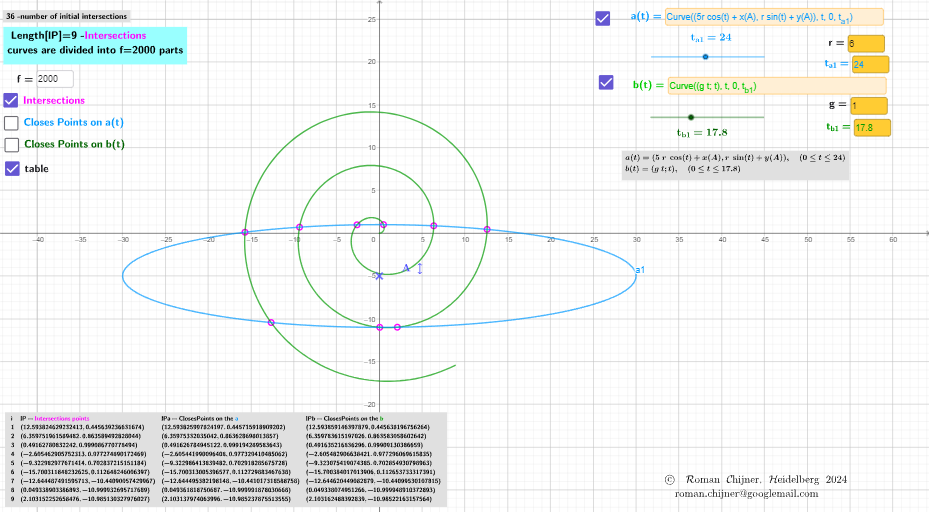
This example demonstrates how to visualize and approximate the intersection region of two curves by computing their intersection curve behavior and using a polyline approximation near the crossing area. The main ideas include curve intersection, piecewise (polyline) approximation, representing curves as Cartesian coordinate objects, and using parameter sampling guided by curve length to obtain a faithful geometric depiction. Construction-wise, it is built with GeoGebra commands such as CurveCartesian to define Cartesian curves, Length to measure curve length and determine a suitable parameter range or sampling scheme, and Unique to manage distinct geometric objects. It also uses Textfield and TableText (with on-screen labels like text1/text2/text3/...) to display computed parameters and results, InputBox1–InputBox8 for interactive control, and button1 to trigger recomputation. The objects named in the construction (e.g., t_{a1}, t_{b1}, f, A, r, and lP/lPa1/lPb1) indicate parameter values and point/segment organization for the polyline approximation. Suitable for secondary and early university levels, especially for lessons on analytic geometry, function graphing, and numerical/geometric approximation of intersections.
GeoGebra Commands & Parameters
CurveCartesian(((g * t); t), t, 0, t_{b1}) → b1CurveCartesian((((5 * r) * cos(t)) + x(A), (r * sin(t)) + y(A)), t, 0, t_{a1}) → a1Length(r1) → lär1Unique(y(RemoveUndefined[Flatten[Sequence[RemoveUndefined[Sequence[If[Distance[r1(k), r1(s)] < 0.01, (s, k), NaN], k, s + 1, Length[r1]]], s, 1, Length[r1] - 1]]])) → r2Textfield(h) → InputBox1Zip(r1(k), k, (1…lär1) \ r2) → lPZip(ClosestPoint[a1, lP(k)], k, 1…Length[lP]) → lPa1Zip(ClosestPoint[b1, lP(k)], k, 1…Length[lP]) → lPb1Textfield(a1) → InputBox2Textfield(b1) → InputBox3Textfield(g) → InputBox4Textfield(r) → InputBox5Textfield(f) → InputBox6Length(lP) → lälPLength(r2) → lär2Textfield(t_{a1}) → InputBox7Textfield(t_{b1}) → InputBox8TableText(Append["i", 1…Length[lP]], Append["lP- \fgcolor{magenta}{Intersections\;points}", lP], Append["lPa-ClosesPoints \;on\; the\; \fgcolor{#0099FF}{a} ", lPa1], Append["lPb-ClosesPoints \;on\; the\;\fgcolor{#009900}{b}", lPb1], "v") → text5
AI Drawing Prompt Reference
Draw the approximate intersection region of two curves defined by g*t and (5*r*cos(t)+x(A), r*sin(t)+y(A)). Use parameter t to define the curves and measure their lengths to determine the appropriate parameter range. Represent the intersection region with points lP, and find the closest points on curves a1 and b1 to lP, denoted as lPa1 and lPb1.
The prompt above was compiled from the original drawing commands and is for reference only.