
Tracing a Parabolic Cylinder via Intersections
Loading the math board and drawing, please wait…
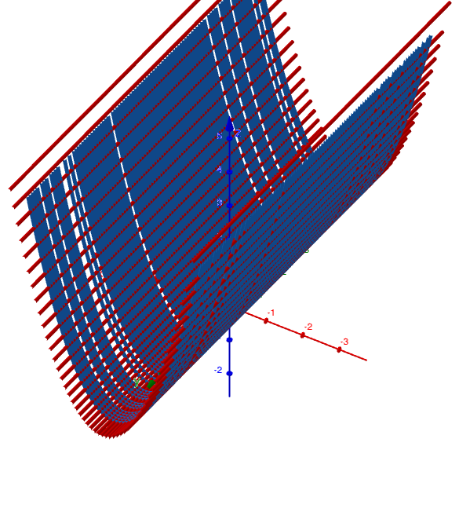
This GeoGebra example demonstrates how to trace the visual structure associated with a parabolic cylinder by using intersection-based construction and path tracing. It focuses on parabolas (and the geometric idea of extending a parabola into a parabolic-cylinder form), coordinate-geometry relationships between lines and intersection points, and the way interactive geometry software can build a complex curve by progressively generating traced paths. Construction highlights: from the “construction summary” it relies on commands such as IntersectPath and Line, together with key objects like f, P, p, c, ptr, R, rtr, A, and g. In practice, a starting curve/function f is combined with straight-line constructions (Line) to compute intersections, then those intersection results drive the creation of paths (ptr, rtr) so the final traced curve/contour becomes visible. Suitable for high-school upper grades and early university learners studying analytic geometry and graphing, and for classroom demonstrations or guided exploration of how intersections and tracing produce more intricate geometric loci.
GeoGebra Commands & Parameters
IntersectPath(p, f) → cLine(A, yAxis) → g
AI Drawing Prompt Reference
Draw a parabolic cylinder formed by extending a parabola. Start with a parabola function, then use straight lines to find intersections with the coordinate axes. These intersections drive the creation of paths, resulting in a continuous curve made of multiple parabolic segments. The graph should show the extension of the parabola in space and the connection between different parabolic segments.
The prompt above was compiled from the original drawing commands and is for reference only.