
Polyline Approximation of a Rose Curve to Find Self-Intersection Points
Loading the math board and drawing, please wait…
In collections
intersection: surface-surface, curve-curve
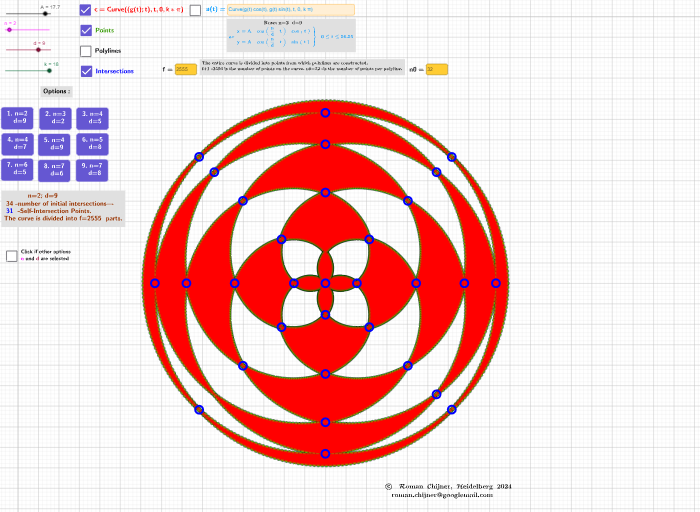
This example demonstrates how to approximate a rose curve with a polyline (piecewise linear path) and then compute its self-intersection points, making the overlapping “petals” geometry visually clear. The key math ideas include rose-curve parameterization (typically linked to polar-form expressions), construction using trigonometric relationships, discretizing a curve into sample points, and using intersection computation to locate where the curve crosses itself. In GeoGebra, Textfield and input boxes manage parameters (such as n, k, and sampling controls); CurveCartesian defines the curve; LaTeX is used for formula/label rendering; Sequence generates a list of discrete sample values; PolyLine builds the polyline approximation; Intersect finds intersection points between curve segments/approximations; and Mod/Div help control periodic indexing and segmentation for consistent generation. Objects include the constructed function/curve (e.g., f), parameter variables, the polyline approximation, and the resulting intersection point set for display. Suitable for secondary school through early university lessons on parametric curves, trigonometry, and geometric constructions, as well as classroom visualization of numerical approximation and intersection-finding.
GeoGebra Commands & Parameters
Textfield(h) → InputBox1CurveCartesian((g(t) * cos(t)), (g(t) * sin(t)), t, 0, (k * pi)) → aLaTeX(a, false, false) → text4aTextfield(a) → InputBox2Mod(f + 1, n0 - 1) → mod_fcDiv(f + 1, n0 - 1) → q_fcTextfield(f) → Eingabefeld1Textfield(n0) → InputBox6CurveCartesian((g(u); u), u, 0, (k * pi)) → cSequence(PolyLine[m3_0y(k)], k, 1, q_fc + 1) → lPoly_yPolyLine(Join[{m3_0y(k1), m3_0y(k1 + 1)}]) → poly1aPolyLine(Join[{m3_0y(k2), m3_0y(k2 + 1)}]) → poly2aIntersect(poly1a, poly2a) → D
AI Drawing Prompt Reference
Create a rose curve in Cartesian coordinates using a parametric definition with trigonometric components, with the parameter running from 0 to k·π. Approximate the curve by discretizing it into sampled points and connecting each adjacent pair into a piecewise linear polyline, forming the overlapping “petals” shape. Then compute intersections between two polyline segments corresponding to different parts of the approximation to detect where the curve crosses itself. Display the resulting polyline approximation and the intersection points together in one coordinate plane.
The prompt above was compiled from the original drawing commands and is for reference only.