
Multiple Projections of Simple Harmonic Motion and Uniform Circular Motion
Loading the math board and drawing, please wait…
In collections
El dominio del Tiempo (cinemática intuitiva)
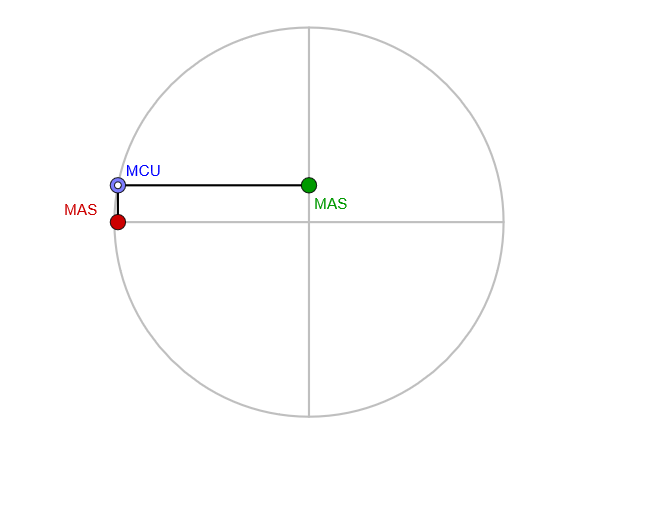
This GeoGebra example demonstrates the geometric relationship between Simple Harmonic Motion (MAS) and Uniform Circular Motion (MCU) by showing multiple simultaneous projections onto different circles, illustrating how sine and cosine functions are generated from circular motion. Key mathematical concepts include: trigonometric representation of SHM, parametric equations of circular motion, and the relationship between period and amplitude. Construction details: Circle commands create reference circles, Point commands mark moving points on circles, Sequence commands generate animation sequences, Rotate commands rotate points, Intersect commands find projection intersections, and PolyLine commands draw trajectory curves. Objects include amplitude parameter amplitud, circles c/c1/c2/c3/c4, centers O1/O2/O3/O4, points A/A1/A2/A3/A4, and projection lines diaH1/diaV/proy1. Suitable for high school upper grades and college freshmen to understand the physical meaning of trigonometric functions, or as a visual aid for teaching parametric equations.
GeoGebra Commands & Parameters
Circle(O1, amplitud) → c1Point(c1) → A1Circle(A1 / 2, amplitud / 2) → cSegment(O1 + (amplitud, 0), O1 + ((-amplitud), 0)) → diaH1Sequence(Rotate[diaH1, k, O1], k, pi / 50, pi, pi / 50) → dia1Sequence(Intersect[dia1(k), OrthogonalLine[A1, dia1(k)]], k, 1, Length[dia1]) → proy1Segment(A1, A2) → p1Segment(O2, A2) → s2Rotate(Segment[O2 + (amplitud / 2, 0), O2 + (((-amplitud)) / 2, 0)], (20 * pi / 50), O2) → dia2Intersect(dia2, OrthogonalLine[A2, dia2]) → A3Circle(O2, amplitud / 2) → c2Circle(O3, amplitud / 4) → c3Segment(O3, A3) → s3Segment(O1, A1) → s1Rotate(Segment[O3 + (amplitud / 4, 0), O3 + (((-amplitud)) / 4, 0)], (25 * pi / 50), O3) → dia3Intersect(dia3, OrthogonalLine[A3, dia3]) → A4Circle(O4, amplitud / 8) → c4Segment(O4, A4) → s4Rotate(Segment[O4 + (amplitud / 8, 0), O4 + (((-amplitud)) / 8, 0)], (30 * pi / 50), O4) → dia4Intersect(dia4, OrthogonalLine[A4, dia4]) → A5Circle(O5, amplitud / 16) → c5Rotate(Segment[O5 + (amplitud / 16, 0), O5 + (((-amplitud)) / 16, 0)], (35 * pi / 50), O5) → dia5Intersect(dia5, OrthogonalLine[A5, dia5]) → A6Circle(O6, amplitud / 32) → c6Rotate(Segment[O6 + (amplitud / 32, 0), O6 + (((-amplitud)) / 32, 0)], (40 * pi / 50), O6) → dia6Circle(O7, amplitud / 64) → c7PolyLine(O1, O2, O3, O4, O5, O6, O7) → pol
AI Drawing Prompt Reference
Create a geometric diagram linking simple harmonic motion and uniform circular motion via multiple simultaneous projections. Place several circle centers O1 through O7 along the same reference line, and use an amplitude parameter amplitud so that the radii are amplitud, then amplitud/2, amplitud/4, … down to amplitud/64. Mark a moving point on each circle (A1, A3, A4, A5, A6 as in the construction) and draw the segment from each point to its corresponding center. Start by drawing the horizontal diameter through O1 with length 2·amplitud, then generate a rotating line by sweeping the diameter endpoints with a fixed angular step from pi/50 to pi, using the rotated line and the orthogonal projection from the moving point to form intersection points that define the next moving point. Repeat the same projection-and-intersection idea for the inner circles at their respective rotation step sizes, and finally connect O1, O2, O3, O4, O5, O6, O7 with a polyline to show the overall trajectory structure.
The prompt above was compiled from the original drawing commands and is for reference only.