
Harmonograph (Lissajous figures)
Loading the math board and drawing, please wait…
In collections
The Domain of the Time (intuitive kinematics)
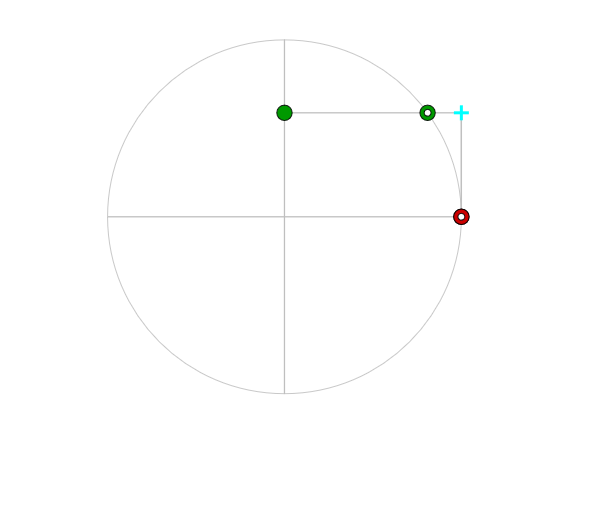
This example demonstrates Harmonographs, which are Lissajous figures created by combining two sinusoidal functions. It involves core math concepts like trigonometry, parametric equations, coordinate geometry, and vector mathematics. Construction highlights include using GeoGebra commands like Circle, Point, Segment, Rotate, Intersect, PolyLine, and Polygon. Suitable for high school and above students exploring function transformations and combinations.
GeoGebra Commands & Parameters
Circle((0, 0), amplitud) → dPoint(d) → ASegment((amplitud, 0), ((-amplitud), 0)) → diaHRotate(diaH, pi / 2) → diaVIntersect(diaH, OrthogonalLine[A, diaH]) → AxPoint(d) → BIntersect(diaV, OrthogonalLine[B, diaV]) → ByPolyLine(reg) → polPolygon((((-amplitud), (-amplitud)) * 1.1), ((amplitud, (-amplitud)) * 1.1), ((amplitud, amplitud) * 1.1), (((-amplitud), amplitud) * 1.1)) → polígono1, polígono1_{2}, polígono1_{3}, polígono1_{4}, polígono1_{5}
AI Drawing Prompt Reference
Draw a harmonograph created by combining two sine functions. Start by drawing a circle and taking a point A on it. Then draw horizontal and vertical line segments, rotate one of them and find their intersection points Ax and By. Finally, use these points to draw a quadrilateral.
The prompt above was compiled from the original drawing commands and is for reference only.