
Catenoide Transformation Demo
Loading the math board and drawing, please wait…
In collections
geometriadinamica.es
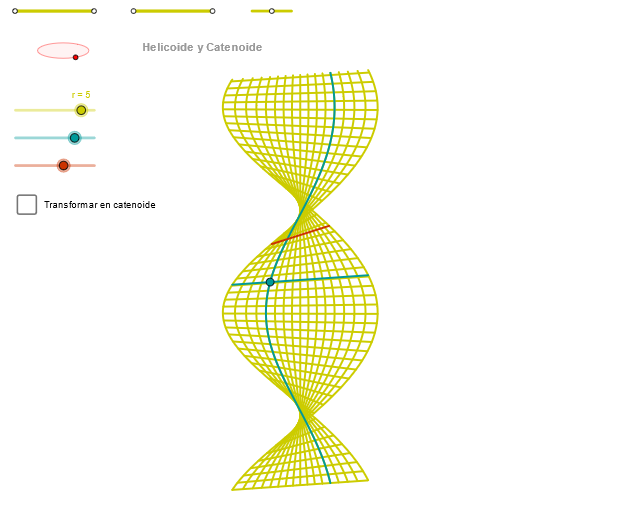
This example demonstrates the transformation process and geometric form of the catenoide curve. It involves core mathematical concepts such as analytical geometry, ellipses, parametric equations, and geometric transformations. The construction utilizes GeoGebra commands and objects like segments, points, orthogonal lines, circles, intersections, ellipses, angles, Cartesian curves, and sequences. Suitable for high school and above mathematics learners to understand the generation and transformation properties of complex curves.
GeoGebra Commands & Parameters
Segment(Q5, Q6) → p5Point(p5) → P5Segment(Q3, Q4) → p2Point(p2) → P3Segment(P3, Q4) → p4Point(p4) → P4Segment(Q1, Q2) → p1Point(p1) → P1Segment(P1, Q2) → p3Point(p3) → P2OrthogonalLine(C, yAxis) → zz1Circle(C, 0.62) → zz0Intersect(zz0, zz1, 1) → ZZ1Intersect(zz0, zz1, 2) → ZZ2Ellipse(ZZ1, ZZ2, 0.65) → zElipse1Intersect(zElipse1, zz1) → ZZ5, ZZ6Point(zElipse1) → XYAngle(ZZ6, C, XY) → zAngRotOrthogonalLine(C, xAxis) → zz2Intersect(zz0, zz2, 2) → ZZ3Intersect(zz0, zz2, 1) → ZZ4Ellipse(ZZ3, ZZ4, 0.65) → zElipse2Intersect(zElipse2, zz2) → ZZ7, ZZ8Point(zElipse2) → ZAngle(ZZ8, C, Z) → zAngIncSegment(ZZ5, ZZ6) → zz4Segment(ZZ7, ZZ8) → zz3Intersect(zElipse2, zElipse1, 1) → zPunto1Intersect(zElipse2, zElipse1, 4) → zPunto2Segment(zPunto1, zPunto2) → zSeg2CurveCartesian((r / 3 * (((((cos(a) * sinh(α)) * sin(u)) + ((sin(a) * cosh(α)) * cos(u))) * sin(zAngRot)) + ((((cos(a) * sinh(α)) * cos(u)) + ((sin(a) * cosh(α)) * sin(u))) * cos(zAngRot)))), (r / 3 * ((((-(((cos(a) * sinh(α)) * sin(u)) + ((sin(a) * cosh(α)) * cos(u)))) * cos(zAngRot)) * sin(zAngInc)) + (((((cos(a) * sinh(α)) * cos(u)) + ((sin(a) * cosh(α)) * sin(u))) * sin(zAngRot)) * sin(zAngInc)) + (((u * cos(a)) + (α * sin(a))) * cos(zAngInc)))) - 4 + (2 * a), u, u1, u2) → curva2CurveCartesian((r / 3 * (((((cos(a) * sinh(v)) * sin(β)) + ((sin(a) * cosh(v)) * cos(β))) * sin(zAngRot)) + ((((cos(a) * sinh(v)) * cos(β)) + ((sin(a) * cosh(v)) * sin(β))) * cos(zAngRot)))), (r / 3 * ((((-(((cos(a) * sinh(v)) * sin(β)) + ((sin(a) * cosh(v)) * cos(β)))) * cos(zAngRot)) * sin(zAngInc)) + (((((cos(a) * sinh(v)) * cos(β)) + ((sin(a) * cosh(v)) * sin(β))) * sin(zAngRot)) * sin(zAngInc)) + (((β * cos(a)) + (v * sin(a))) * cos(zAngInc)))) - 4 + (2 * a), v, v1, v2) → a1CurveCartesian((r / 3 * ((((-sin(a)) * cosh(v)) * sin(zAngRot)) - ((cos(a) * sinh(v)) * cos(zAngRot)))), (r / 3 * ((((sin(a) * cosh(v)) * cos(zAngRot)) * sin(zAngInc)) - (((cos(a) * sinh(v)) * sin(zAngRot)) * sin(zAngInc)) + (((3.14159 * cos(a)) + (v * sin(a))) * cos(zAngInc)))) - 4 + (2 * a), v, v1, v2) → curva1ASequence(CurveCartesian[(r / 3 * (((((cos(a) * sinh(v)) * sin(u)) + ((sin(a) * cosh(v)) * cos(u))) * sin(zAngRot)) + ((((cos(a) * sinh(v)) * cos(u)) + ((sin(a) * cosh(v)) * sin(u))) * cos(zAngRot)))), (r / 3 * ((((-(((cos(a) * sinh(v)) * sin(u)) + ((sin(a) * cosh(v)) * cos(u)))) * cos(zAngRot)) * sin(zAngInc)) + (((((cos(a) * sinh(v)) * cos(u)) + ((sin(a) * cosh(v)) * sin(u))) * sin(zAngRot)) * sin(zAngInc)) + (((u * cos(a)) + (v * sin(a))) * cos(zAngInc)))) - 4 + (2 * a), u, u1, u2], v, v1, v2, paso) → list2Sequence(CurveCartesian[(r / 3 * (((((cos(a) * sinh(v)) * sin(u)) + ((sin(a) * cosh(v)) * cos(u))) * sin(zAngRot)) + ((((cos(a) * sinh(v)) * cos(u)) + ((sin(a) * cosh(v)) * sin(u))) * cos(zAngRot)))), (r / 3 * ((((-(((cos(a) * sinh(v)) * sin(u)) + ((sin(a) * cosh(v)) * cos(u)))) * cos(zAngRot)) * sin(zAngInc)) + (((((cos(a) * sinh(v)) * cos(u)) + ((sin(a) * cosh(v)) * sin(u))) * sin(zAngRot)) * sin(zAngInc)) + (((u * cos(a)) + (v * sin(a))) * cos(zAngInc)))) - 4 + (2 * a), v, v1, v2], u, u1, u2, paso) → list1
AI Drawing Prompt Reference
Draw a catenoid curve. First, draw some basic line segments and points. Then, draw vertical lines for the y-axis and x-axis, and a circle with radius 0.62. Next, find the intersection points of the circle with the vertical lines and use them to draw an ellipse. Again, find the intersection points of the ellipse with the vertical lines and calculate the corresponding angles. Then, connect these intersection points with line segments. Finally, generate a Cartesian curve using parametric equations and draw a sequence of parametric curves to show the transformation process and geometric shape of the catenoid curve. This process involves concepts like analytical geometry, ellipses, parametric equations, and geometric transformations, suitable for high school and above mathematics learners to understand the generation and transformation properties of complex curves.
The prompt above was compiled from the original drawing commands and is for reference only.