
Astroid Classical Construction: Locus Construction Demo
Loading the math board and drawing, please wait…
In collections
History of Maths
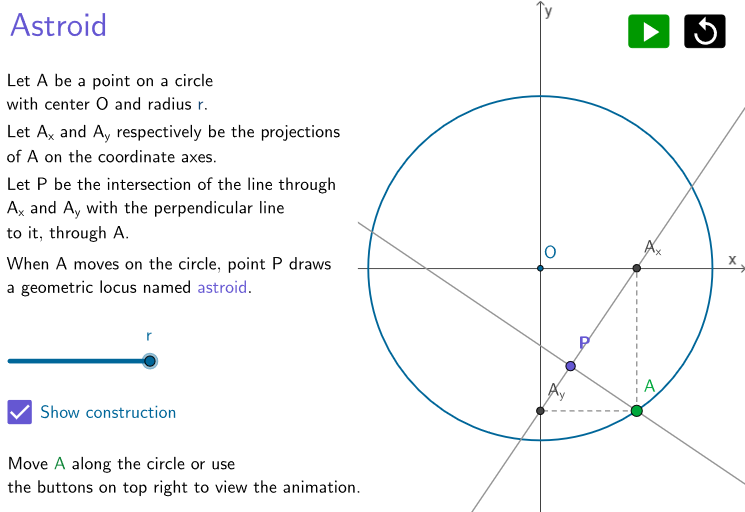
This GeoGebra example demonstrates how the astroid (a four-cusped curve) can be obtained as the locus of a moving point under classical geometric constraints. The main mathematical ideas are locus (locus construction), circle-based geometry, orthogonality constraints, and generating a well-known curve by dynamically defined intersection points. The construction uses Circle to define the base circle(s), Point to create key reference and moving points (e.g., A and P), Line/Segment to structure connecting geometry, OrthogonalLine to enforce right-angle constraints between relevant lines, and Intersect to compute the dependent points whose movement traces the astroid. With the construction updating as the configuration changes (e.g., via interactive iteration controls), the curve emerges as the set of all positions of the locus point. Suitable for secondary-school enrichment, early undergraduate geometry/coordinate-geometry courses, and interactive lessons on how famous curves arise from simple geometric operations.
GeoGebra Commands & Parameters
Circle((0, 0), r) → cPoint(c) → ASegment(A, A_x) → aSegment(A, A_y) → bLine(A_y, A_x) → dOrthogonalLine(A, d) → eIntersect(d, e) → P
AI Drawing Prompt Reference
Draw a circle centered at the origin with a fixed radius. Take a moving point A on this circle, and drop perpendiculars from A to the x-axis and y-axis, marking the projection points on each axis. Connect these two projection points to form a line, then draw a line through A perpendicular to this connecting line. As point A travels around the circle, the intersection point of these two lines traces a four-cusped astroid curve, demonstrating how a well-known curve emerges from simple orthogonal geometric constraints.
The prompt above was compiled from the original drawing commands and is for reference only.