
Derivation of Circle Area Formula
Loading the math board and drawing, please wait…
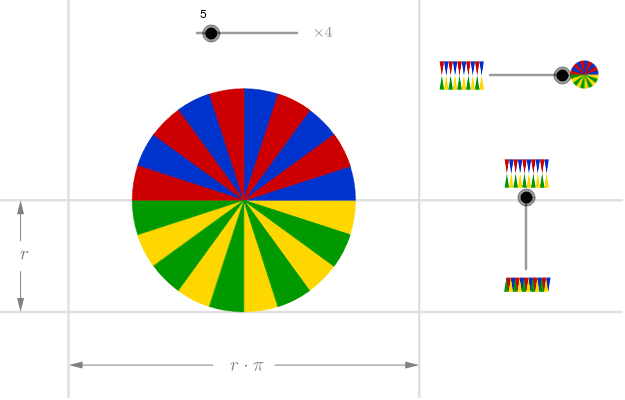
This example demonstrates how to derive the area formula of a circle through a geometric approach. By dividing a circle into multiple equal sectors and rearranging them, they can approximately form a rectangle: its height equals the radius (r), and its length equals half the circumference (πr), visually showing that the area is πr². Key mathematical concepts include the circle area formula, the concept of limits, and geometric transformations. Construction details: Use the Sequence command to generate multiple division points (n divisions of the circle), define sector vertices with Point, draw radius vectors using Vector, construct perpendicular relationships via OrthogonalLine, arrange sectors with Mirror, and find key intersections using Intersect. Suitable for middle school mathematics courses on circle area formula derivation, and for understanding the application of limits in geometry.
GeoGebra Commands & Parameters
Sequence((((2 * i) - 1) * a), i, 1, n) → anglesSequence(Vector[(d * Vector[(cos((-Element[angles, i])), sin((-Element[angles, i])))])], i, 1, n) → vectorsSequence(Midpoint[Cell[2, i], Cell[2, 1 + i]], i, 1, n) → midpointsSequence(Intersect[Circle[Cell[2, i], 1], OrthogonalLine[Element[midpoints, i], Line[Cell[2, i], Cell[2, 1 + i]]]], i, 1, n) → lowpointsSequence(Mirror[Element[lowpoints, i], yAxis], i, 1, n) → lowpoints2Sequence(Midpoint[Cell[3, i], Cell[3, 1 + i]], i, 1, n) → midpointsDownSequence(Intersect[Circle[Cell[3, i], 1], OrthogonalLine[Element[midpointsDown, i], Line[Cell[3, i], Cell[3, 1 + i]]]], i, 1, n) → uppointsSequence(Mirror[Element[uppoints, i], yAxis], i, 1, n) → uppoints2Point(yAxis) → BOrthogonalLine(B, yAxis) → gPoint(g) → CMirror(C, yAxis) → C'Point(h) → DMirror(D, (-2, -0.5)) → D'Intersect(b, xAxis) → EIntersect(c, h) → FIntersect(e, g) → GIntersect(g, f) → HVector(D', I) → uVector(D, F) → vVector(C', G) → wVector(C, H) → zSequence(CircleSector[Element[uppoints, i], Cell[3, 1 + i], Cell[3, i]], i, 1, n, 2) → sectorsDown1Sequence(CircleSector[Element[uppoints2, i], Mirror[Cell[3, i], yAxis], Mirror[Cell[3, 1 + i], yAxis]], i, 1, n, 2) → sectorsDown3Sequence(CircleSector[Element[lowpoints, i], Cell[2, 1 + i], Cell[2, i]], i, 1, n, 2) → sectors1Sequence(CircleSector[Element[lowpoints2, i] + ((2 * x(A)), 0), Mirror[Cell[2, i], yAxis] + ((2 * x(A)), 0), Mirror[Cell[2, 1 + i], yAxis] + ((2 * x(A)), 0)], i, 1, n, 2) → sectors3Sequence(CircleSector[Element[lowpoints, i], Cell[2, 1 + i], Cell[2, i]], i, 2, n, 2) → sectors2Sequence(CircleSector[Element[lowpoints2, i] + ((2 * x(A)), 0), Mirror[Cell[2, i], yAxis] + ((2 * x(A)), 0), Mirror[Cell[2, 1 + i], yAxis] + ((2 * x(A)), 0)], i, 2, n, 2) → sectors4Sequence(CircleSector[Element[uppoints, i], Cell[3, 1 + i], Cell[3, i]], i, 2, n, 2) → sectorsDown2Sequence(CircleSector[Element[uppoints2, i], Mirror[Cell[3, i], yAxis], Mirror[Cell[3, 1 + i], yAxis]], i, 2, n, 2) → sectorsDown4
AI Drawing Prompt Reference
Draw a diagram illustrating the derivation of the circle area formula. A circle is divided into many equal sectors, which can be rearranged to approximate a rectangle. The rectangle's width equals the radius of the circle, and its height equals half the circumference, πr, so the area is πr². The diagram should clearly show the circle, sectors, rectangle, and their relationships to help understand the geometric meaning of the formula.
The prompt above was compiled from the original drawing commands and is for reference only.