
Cyclical Pendulum: Parametric Track with Tangent and Osculating Geometry
Loading the math board and drawing, please wait…
In collections
El dominio del Tiempo (cinemática intuitiva)
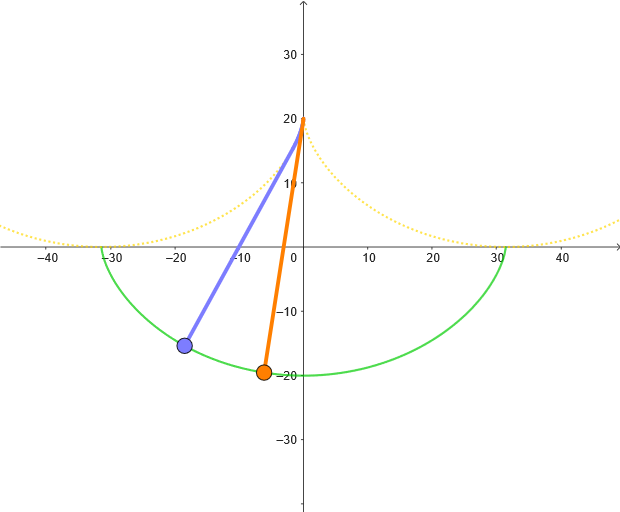
This GeoGebra example demonstrates the motion of a cycloidal-pendulum system by animating a point moving along a parametric curve. As the time parameter evolves, the construction reveals not only the trajectory but also its instantaneous geometric behavior via the tangent direction and the osculating circle, giving a visual sense of local curvature. The main mathematical ideas include parametric equations, Cartesian parametric curve construction, tangent lines, unit tangent vectors, orthogonal geometric constructions, and osculating circles as a curvature-related local approximation. Key construction steps extracted from the command summary: CurveCartesian creates the parametric path; Point and Tangent locate the moving point and its tangent line; UnitVector provides the normalized tangential direction, while OrthogonalLine builds perpendicular directions; Segment is used for clear geometric links; OsculatingCircle visualizes the osculating circle along the trajectory; and time/parameter controls (e.g., t0, t1, dt, animation variables) along with physical parameters (e.g., ω, g, c) drive the animation. Suitable for high school through early university students, especially for lessons on parametric curves and calculus-oriented concepts like tangency and curvature.
GeoGebra Commands & Parameters
CurveCartesian((((α - pi) * r), (-r)) + (r; α + pi / 2), α, 0, (2 * pi)) → cPoint(c) → MTangent(M, c) → iUnitVector(i) → nCurveCartesian(((α * r), r) + (r; α + pi / 2), α, (-2 * pi), (2 * pi)) → c1CurveCartesian(((α * r), r) + (r; α + pi / 2), α, (-pi), pi) → c2Point(c2, PathParameter[M]) → PMCurveCartesian(((α * r), r) + (r; α + pi / 2), α, 0, ((2 * pi) * (PathParameter[M] - 0.5))) → m2CurveCartesian(((α * r), r) + (r; α + pi / 2), α, ((2 * pi) * (PathParameter[M] - 0.5)), 0) → m1Segment(PM, M) → jOrthogonalLine(M, i) → hPoint(c) → ATangent(A, c) → iAUnitVector(iA) → nACurveCartesian(((α * r), r) + (r; α + pi / 2), α, ((2 * pi) * (PathParameter[A] - 0.5)), 0) → a1CurveCartesian(((α * r), r) + (r; α + pi / 2), α, 0, ((2 * pi) * (PathParameter[A] - 0.5))) → a2Point(c2, PathParameter[A]) → PASegment(PA, A) → fOsculatingCircle(M, c) → d
AI Drawing Prompt Reference
Draw a cycloidal trajectory using parametric equations. First, plot the parametric curve, then select a point M on the curve and draw its tangent line and unit tangent vector. Next, plot two opposite parametric curves c1 and c2, and their tangent lines and unit tangent vectors at point M. Use path parameters to calculate the tangent lines and unit tangent vectors at points M and A, and finally draw the osculating circles at points M and A.
The prompt above was compiled from the original drawing commands and is for reference only.