
“Gota” Geometric Construction: Unit Circle–Ellipse Link, Angles & Similar Triang
Loading the math board and drawing, please wait…
In collections
geometriadinamica.es
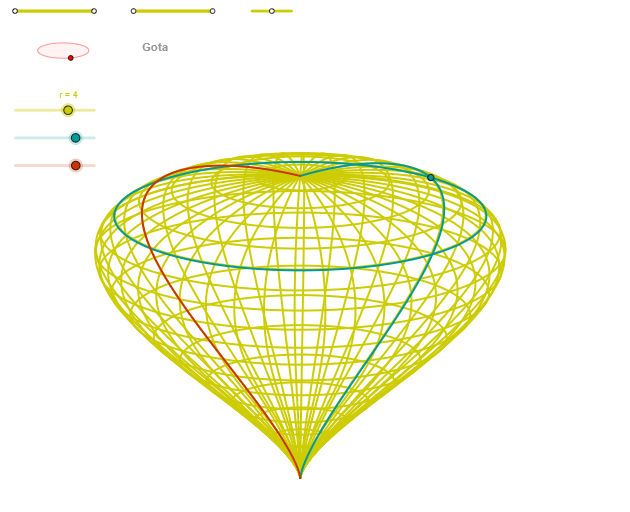
This example demonstrates how to build a “droplet-like” geometric configuration on the coordinate plane by coupling a unit circle (and related circle constraints) with an ellipse, and then using angle relationships and similar triangles to determine the key points that drive the final curve.
The main mathematical ideas include: unit circle and circle intersections, geometric construction of an ellipse, angle measurement and constraints (including rotation-angle style relations), and similar triangles (proportionality of corresponding sides) to explain how points and segments align.
Construction highlights in GeoGebra: Segment and Point are used to define baseline segments and anchor points; OrthogonalLine creates perpendicular constraints; Circle forms the unit/auxiliary circle and Intersect extracts critical intersection points; Ellipse generates the target ellipse; Angle records/controls the required angular relationship; finally CurveCartesian together with Sequence supports constructing or parametrizing the resulting curve. The object set also reflects derived quantities controlling the ellipse and rotation (e.g., entries like zElipse1 and zAngRot), along with the computed intersection-based points.
Suitable for: high-school geometry & analytic geometry lessons (geometric construction), contest geometry practice, and classroom use to illustrate how circle/ellipse geometry plus similarity and angle constraints can be visualized and modeled in GeoGebra.
GeoGebra Commands & Parameters
Segment(Q3, Q4) → p2Point(p2) → P3Segment(P3, Q4) → p4Point(p4) → P4Segment(Q1, Q2) → p1Point(p1) → P1Segment(P1, Q2) → p3Point(p3) → P2OrthogonalLine(C, yAxis) → zz1Circle(C, 0.62) → zz0Intersect(zz0, zz1, 1) → ZZ1Intersect(zz0, zz1, 2) → ZZ2Ellipse(ZZ1, ZZ2, 0.65) → zElipse1Intersect(zElipse1, zz1) → ZZ5, ZZ6Point(zElipse1) → XYAngle(ZZ6, C, XY) → zAngRotOrthogonalLine(C, xAxis) → zz2Intersect(zz0, zz2, 2) → ZZ3Intersect(zz0, zz2, 1) → ZZ4Ellipse(ZZ3, ZZ4, 0.65) → zElipse2Intersect(zElipse2, zz2) → ZZ7, ZZ8Point(zElipse2) → ZAngle(ZZ8, C, Z) → zAngIncSegment(Q5, Q6) → p5Point(p5) → P5Segment(ZZ5, ZZ6) → zz4Segment(ZZ7, ZZ8) → zz3Intersect(zElipse2, zElipse1, 1) → zPunto1Intersect(zElipse2, zElipse1, 4) → zPunto2Segment(zPunto1, zPunto2) → zSeg2CurveCartesian((r * (((((a * (b - cos(α))) * sin(α)) * cos(v)) * sin(zAngRot)) + ((((a * (b - cos(α))) * sin(α)) * sin(v)) * cos(zAngRot)))), (r * (((((((-a) * (b - cos(α))) * sin(α)) * cos(v)) * cos(zAngRot)) * sin(zAngInc)) + (((((a * (b - cos(α))) * sin(α)) * sin(v)) * sin(zAngRot)) * sin(zAngInc)) + (cos(α) * cos(zAngInc)))), v, v1, v2) → curva2CurveCartesian((r * ((((-a) * (b - cos(u))) * sin(u)) * sin(zAngRot))), (r * (((((a * (b - cos(u))) * sin(u)) * cos(zAngRot)) * sin(zAngInc)) + (cos(u) * cos(zAngInc)))), u, u1, u2) → curva1CurveCartesian((r * (((((a * (b - cos(u))) * sin(u)) * cos(β)) * sin(zAngRot)) + ((((a * (b - cos(u))) * sin(u)) * sin(β)) * cos(zAngRot)))), (r * (((((((-a) * (b - cos(u))) * sin(u)) * cos(β)) * cos(zAngRot)) * sin(zAngInc)) + (((((a * (b - cos(u))) * sin(u)) * sin(β)) * sin(zAngRot)) * sin(zAngInc)) + (cos(u) * cos(zAngInc)))), u, u1, u2) → a1Sequence(CurveCartesian[(r * (((((a * (b - cos(u))) * sin(u)) * cos(v)) * sin(zAngRot)) + ((((a * (b - cos(u))) * sin(u)) * sin(v)) * cos(zAngRot)))), (r * (((((((-a) * (b - cos(u))) * sin(u)) * cos(v)) * cos(zAngRot)) * sin(zAngInc)) + (((((a * (b - cos(u))) * sin(u)) * sin(v)) * sin(zAngRot)) * sin(zAngInc)) + (cos(u) * cos(zAngInc)))), v, v1, v2], u, u1, u2, paso) → list2Sequence(CurveCartesian[(r * (((((a * (b - cos(u))) * sin(u)) * cos(v)) * sin(zAngRot)) + ((((a * (b - cos(u))) * sin(u)) * sin(v)) * cos(zAngRot)))), (r * (((((((-a) * (b - cos(u))) * sin(u)) * cos(v)) * cos(zAngRot)) * sin(zAngInc)) + (((((a * (b - cos(u))) * sin(u)) * sin(v)) * sin(zAngRot)) * sin(zAngInc)) + (cos(u) * cos(zAngInc)))), u, u1, u2], v, v1, v2, paso) → list1
AI Drawing Prompt Reference
Draw a droplet-like geometric configuration on the coordinate plane. Start by creating a unit circle centered at the origin, then draw a vertical line through the circle and use their intersection points together with a parameter point to construct the first ellipse. Next, construct a second ellipse using intersections of the unit circle with a horizontal line, making the two ellipses intersect and cross each other. Measure the angles between key points on the ellipses and the circle center to define rotation and inclination angles. Finally, plot parametric curves in two directions using equations involving ellipse coefficients, angle variables, and scale factors, creating a complex family of curves generated by the circle-ellipse coupling.
The prompt above was compiled from the original drawing commands and is for reference only.