
Interactive Unit Circle for Exact Trig Values
Loading the math board and drawing, please wait…
In collections
Trigonometry and Complex Numbers
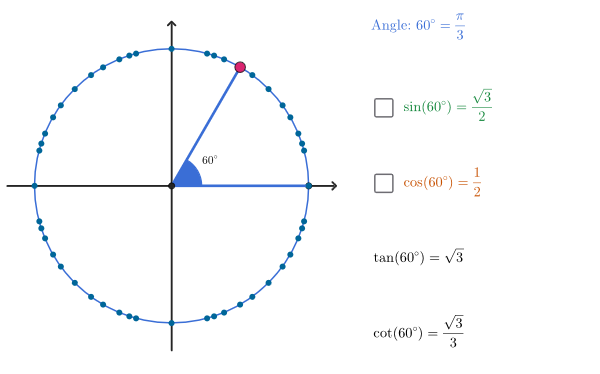
This interactive example lets you explore the unit circle by selecting main angles, showing their positions on the circle and reporting the corresponding measures in degrees and radians, along with exact sine, cosine, and tangent values. It focuses on key ideas such as the unit-circle definition of trigonometric functions, degree–radian conversion, the exact value structure of standard angles, and the sign/ratio relationships behind tan and cot. The GeoGebra construction uses Sequence to generate angle sets, then Sort and Zip to organize angle–point pairs. Points and Segments build the geometric layout (center, circle point, radii/connecting segments). Angle computes the selected angle, while Numerator and Denominator extract exact fractional representations for conversion and labeling. IndexOf is used to locate the chosen angle among the generated lists, and collections like allAng, allPts, allSines, allCosines, and allTg support coordinated display of computed exact values through text objects (e.g., textAng, textSine, textCosine, textTan, textCot). Suitable for secondary/high-school students studying trigonometry and for classroom visualization of exact trig values.
GeoGebra Commands & Parameters
Sequence((15° * t), t, 1, 360 / 15) → seq1, {15*°, 30*°, 45*°, 60*°, 75*°, 90*°, 105*°, 120*°, 135*°, 150*°, 165*°, 180*°, 195*°, 210*°, 225*°, 240*°, 255*°, 270*°, 285*°, 300*°, 315*°, 330*°, 345*°, 360*°}Sequence((18° * t), t, 1, 360 / 18) → seq2, {18*°, 36*°, 54*°, 72*°, 90*°, 108*°, 126*°, 144*°, 162*°, 180*°, 198*°, 216*°, 234*°, 252*°, 270*°, 288*°, 306*°, 324*°, 342*°, 360*°}Sequence((22.5° * t), t, 1, 360 / 22.5) → seq3, {22.5*°, 45*°, 67.5*°, 90*°, 112.5*°, 135*°, 157.5*°, 180*°, 202.5*°, 225*°, 247.5*°, 270*°, 292.5*°, 315*°, 337.5*°, 360*°}Sort(Union[Union[seq1, seq2], seq3]) → allAngZip(Rotate[P0, a], a, allAng) → allPtsPoint(allPts) → PSegment(P, O) → endSEgmSegment(O, P0) → startSegmAngle(P0, O, P) → givenAngSegment((0, -1.2), (0, 1.2)) → fakeYSegment((-1.2, 0), (1.2, 0)) → fakeXNumerator(angConvNoPi) → numAngConvNoPiDenominator(angConvNoPi) → denAngConvNoPiIndexOf(P, allPts) → isSegment(P, PX) → segmSSegment(P, PY) → segmC
AI Drawing Prompt Reference
Draw a unit circle with main angles marked on it, showing their degree and radian measures along with exact sine, cosine, and tangent values. Use a slider to select angles, and construct geometric elements like points on the circle, radii, and connecting segments. Display angle measures in degrees and radians, and calculate sine, cosine, and tangent values, showing them with text objects. Start by drawing the unit circle and axes, then compute positions of points on the circle for selected angles, draw radii and segments, and finally label the angles and trigonometric values.
The prompt above was compiled from the original drawing commands and is for reference only.