
Dynamic Conversion Between Degrees and Radians on the Unit Circle
Loading the math board and drawing, please wait…
In collections
Trigonometry and Complex Numbers
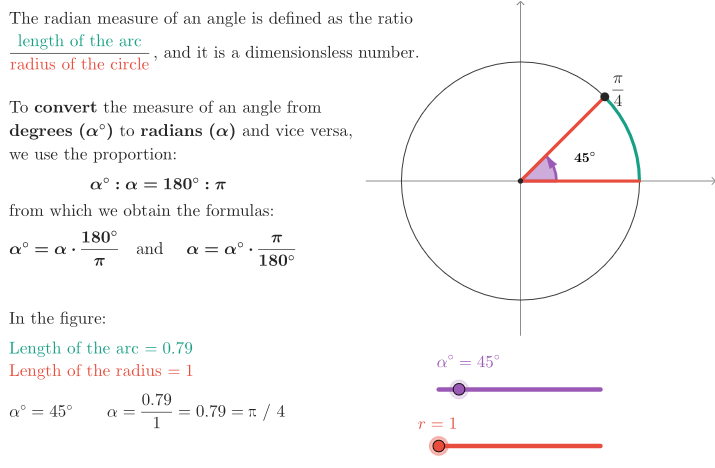
This example dynamically visualizes an angle on the unit circle and shows how the same geometric rotation corresponds to both degree and radian measures. It guides learners through conversion formulas and quick questions to verify conceptual understanding. Key math topics include the definition of angles in degrees and radians, the relationship between arc length and central angle on the unit circle, and the degree↔radian conversion process. Construction highlights: Rotate drives the rotating ray to represent changing angle positions; CircleArc and Segment create the circular arc and related geometric measurements; Polygon is used for visual marking of the angle/region; If controls conditional display of results or annotations; and the visualization is linked to objects such as sliAng (angle input/slider), cfrR (conversion parameter), givenArc and givenArcLen (provided arc/angle information), angRad and textConvert (computed radian value and conversion text), plus textRad/textDescr for labeled explanations, with points like O, A, and P organizing the geometry. Suitable for secondary to introductory college learners as a classroom demonstration or self-study tool before/alongside Trigonometry.
GeoGebra Commands & Parameters
Rotate(A, sliAng, O) → PCircleArc(O, A, P) → givenArcSegment(O, P) → aRotate(A, 60°, O) → BRotate(A, 30°, O) → CRotate(A, 150°, O) → DRotate(A, 210°, O) → ERotate(A, 330°, O) → FRotate(A, 300°, O) → GRotate(A, 240°, O) → HRotate(A, 120°, O) → IRotate(A, 45°, O) → JRotate(A, 315°, O) → KRotate(A, 225°, O) → LRotate(A, 135°, O) → MRotate(A, 90°, O) → NRotate(A, 180°, O) → QRotate(A, 270°, O) → RRotate(A, 359.9999°, O) → A'If(sliAng < 360°, Angle[A, O, P], Angle[A, O, A']) → βSegment(O, A) → tPolygon({((-peepSize) + 0.5, (-peepSize) + 0.5), (peepSize, (-peepSize) + 0.5), (peepSize, peepSize), ((-peepSize) + 0.5, peepSize)}) → peepIf(sliAng ≠ 360°, Length[givenArc], Circumference[c]) → givenArcLen
AI Drawing Prompt Reference
Create a unit-circle style diagram centered at O. Start with a fixed ray from O through A, then use a draggable angle slider to rotate that ray around O until it reaches point P. Draw the circular arc from A to P and include the radius segment from O to P, along with an angle marking showing the current angle β. Add several additional points on the circle obtained by rotating the original ray by various fixed degree measures to visually emphasize angle positions. Include simple radius/segment measures from O to A as needed, and display conversion-related text that compares arc-length/angle information, conditionally showing results such as arc length versus circumference when appropriate.
The prompt above was compiled from the original drawing commands and is for reference only.