
Visualizing Cauchy Radius via Circle and Intersections
Loading the math board and drawing, please wait…
In collections
complex-numbers
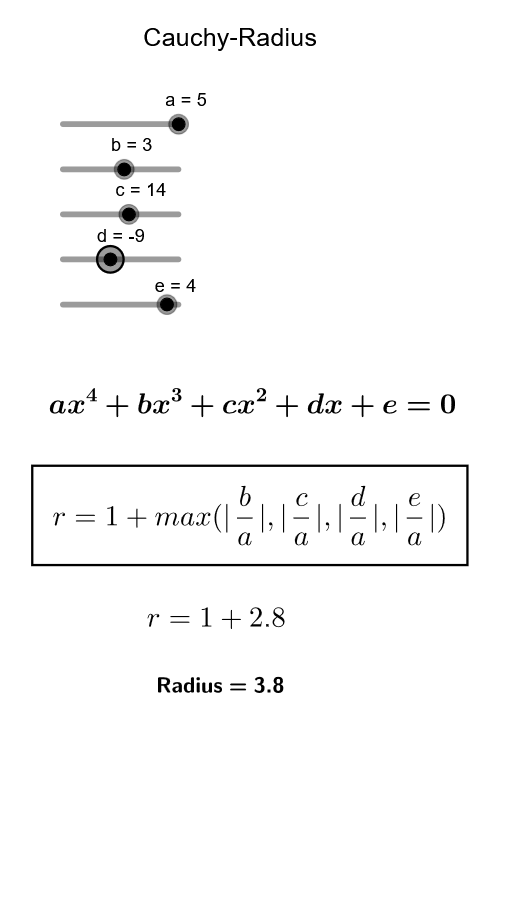
This example visualizes the Cauchy radius bound on the possible locations of roots of a polynomial by constructing a corresponding region on the complex plane. It highlights core ideas from complex numbers and polynomial root bounds, showing how coefficient information leads to a geometric constraint (a circle) that contains all roots within a guaranteed radius. The construction uses GeoGebra’s Max command to compute the radius (from coefficient ratios, producing values such as m/r), Circle to draw the circle determined by a center and that radius, and Intersect to find intersection points that correspond to key visually marked quantities (e.g., candidate root points or auxiliary intersections). The construct also employs multiple labeled objects (Text1–Text5 for formulas/values), parameter points (a–e), reference points (M, A), a polynomial/function representation (f), auxiliary elements (L, v), and several points z_1–z_4 used to display relevant locations. Suitable for high school advanced topics and undergraduate courses covering complex numbers, polynomials, and geometric interpretations of inequalities; good for classroom demonstrations and exploratory learning.
GeoGebra Commands & Parameters
Max(M) → mIntersect(xAxis, yAxis) → ACircle(A, r) → f
AI Drawing Prompt Reference
Draw a circle centered at the origin on the complex plane with a radius determined by the polynomial coefficients. First, calculate the ratio of the polynomial coefficients to get the radius value m. Then, draw a circle with the origin as the center and m as the radius. The intersection point A of the circle and the coordinate axes serves as a reference point.
The prompt above was compiled from the original drawing commands and is for reference only.