
Construct a Piecewise Quadratic Function via Reflection and Angle Bisectors
Loading the math board and drawing, please wait…
In collections
Poorly Drawn Parallelograms 3
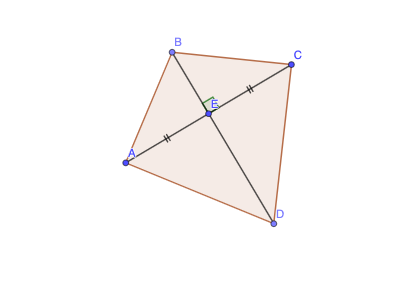
This example demonstrates how to build a piecewise quadratic function using geometric constructions involving circles and reflection symmetry, and then determine the relevant intersection points between the constructed pieces. Key concepts include piecewise functions modeled through geometry, properties of quadratic functions, circle–line (or segment) intersection relationships, and the role of angle bisectors and mirror transformations in enforcing geometric constraints. Construction highlights: Circle is used to create the key circle geometry (objects such as c, C); Mirror constructs reflected points to realize symmetry constraints (e.g., a and a′); LineBisector generates an angle bisector to define consistent angular relations; and Point, Segment, Polygon, and Angle are used to assemble the required vertices/edges (including trapezoid-like polygon structure). Intersection of the resulting geometric entities supports the piecewise behavior and the final key intersection locations. Suitable for high-school geometry–function integration, modeling lessons, and enrichment activities focusing on transformations and graphing.
GeoGebra Commands & Parameters
Circle(E, A) → cMirror(A, E) → CLineBisector(A, C) → fPoint(f) → BPoint(f) → DPolygon(A, B, C, D) → q1, a, c_1, a', dSegment(A, E) → gSegment(E, B) → hSegment(E, C) → iSegment(E, D) → jAngle(C, E, B) → α
AI Drawing Prompt Reference
Construct a piecewise quadratic function using reflection and angle bisectors. Start by drawing a circle with points A and E, then reflect point A over point E to get point C. Draw the angle bisector f of AC and take two points B and D on f. Use points A, B, C, and D to construct a quadrilateral q1. Then draw line segments from point E to B, C, and D, and calculate the angle α at C, E, and B.
The prompt above was compiled from the original drawing commands and is for reference only.