
Two-Way Tables and Venn Diagram Logic for Events
Loading the math board and drawing, please wait…
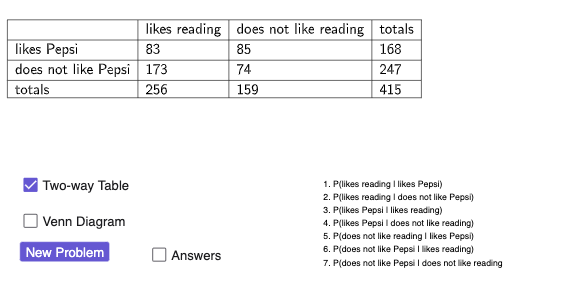
This example demonstrates how counting relationships in two-way tables correspond to Venn diagram regions for two events A and B. It visualizes intersections, unions, and complements using labeled areas such as A \ B (ANOTB), B \ A (BNOTA), and non-both regions (NOTBOTH), linking the table entries to clear set-theoretic meanings. The mathematical focus is on event logic in random experiments and probability & statistics: representing how outcomes are categorized into disjoint regions and how these categories change with different random configurations. Construction-wise, GeoGebra is used to generate data via Random and RandomElement, display the table contents with TableText, draw the two overlapping circles with Circle, and use geometric tools like Mirror and Midpoint for clean positioning and labeling. The created points and text objects (including multiple annotation fields for labels and totals) are tied to the region objects (both/ANOTB/BNOTA/NOTBOTH) so that the diagram and the two-way table stay consistent. Suitable for middle/high school probability, set & logic instruction, interactive classroom activities, and introductory STEM use.
GeoGebra Commands & Parameters
RandomElement(topics) → text1, "reading"RandomElement(topics2) → text2, "Pepsi"Random(50, 150) → bothRandom(50, 200) → ANOTBRandom(50, 200) → BNOTARandom(50, 100) → NOTBOTHTableText({" ", text3, text5, "totals"}, {text4, both, ANOTB, both + ANOTB}, {text6, BNOTA, NOTBOTH, BNOTA + NOTBOTH}, {"totals", both + BNOTA, NOTBOTH + ANOTB, a}, "l_|h") → text7Circle(A, B) → dCircle(B, A) → eMirror(B, A) → B'Mirror(A, B) → A'Midpoint(A, B) → CMidpoint(B, A') → DMidpoint(A, B') → EPoint(e) → F
AI Drawing Prompt Reference
Draw two overlapping circles to represent the Venn diagram for events A and B, with circle A representing event A and circle B representing event B. Label the regions inside the circles with A\B, B\A, and NOTBOTH, and show the totals. Use random numbers to generate the quantities for A\B, B\A, and NOTBOTH, and display them in the corresponding areas. Finally, adjust the positions and labels of the circles using reflection and midpoint tools.
The prompt above was compiled from the original drawing commands and is for reference only.