
Collisions in a Round Box
Loading the math board and drawing, please wait…
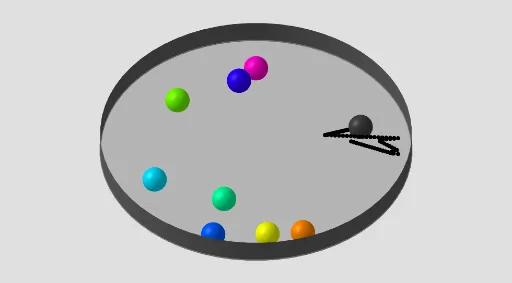
① This example demonstrates the random motion of multiple small balls colliding elastically within a circular boundary, visualizing particle collisions and rebounds in a confined space. ② Core mathematical concepts include circles and geometric transformations, the Pythagorean theorem (for distance and collision detection), random experiments (random initial velocities and positions), and functions and sequences (for generating and managing multiple objects). ③ Construction highlights: GeoGebra commands such as Circle create the circular boundary, Sequence generates multiple balls, Sum and Element are used for calculations and data extraction, and Cylinder may be used for 3D visual elements; objects include n (count), t (time), r (radius), c (center), P (position), v (velocity), d (distance), cv (collision vector), k (collision count), Lc (list), etc., with buttons (Bouton1, Bouton2) controlling animation and reset. ④ Suitable for middle school or high school math/physics enrichment, to understand stochastic processes, motion under geometric constraints, and to use dynamic geometry software for simulation experiments.
GeoGebra Commands & Parameters
Circle((0, 0), r) → cSequence(Vector[Sum[Sequence[If[i ≟ j ∨ Distance[Element[P, j], Element[P, i]] > d, Vector[(0, 0)], Vector[(Vector[Element[P, i], Element[P, j]] * (d - Distance[Element[P, j], Element[P, i]]))]], i, 1, n]]], j, 1, n) → cvSequence(Circle[Element[P, i], d / 2], i, 1, n) → LcSum(v) → svElement(P, nc) → PcSequence(Sphere[Element[P, i], d / 2], i, 1, n) → l1Circle((0, 0, d / 2), r + lv / 2 + d / 2 + 0.5, xOyPlane) → eCylinder(e, (-d)) → b, b_{2}, b_{3}Element(l1, nc) → cLcElement(l1, A1) → B1Element(l1, A2) → B2Element(l1, A3) → B3Element(l1, A4) → B4Element(l1, A5) → B5Element(l1, A6) → B6Element(l1, A7) → B7Element(l1, A8) → B8Element(l1, A9) → B9Element(l1, A10) → B10_{1}Element(l1, A11) → B11_{1}Element(l1, A12) → B12_{1}Element(l1, A13) → B13_{1}Element(l1, A14) → B14_{1}Element(l1, A15) → B15_{1}Element(l1, A16) → B16_{1}Element(l1, A17) → B17_{1}Element(l1, A18) → B18_{1}Element(l1, A19) → B19_{1}Element(l1, A20) → B20_{1}Element(l1, A21) → B21_{1}Element(l1, A22) → B22Element(l1, A23) → B23Element(l1, A24) → B24Element(l1, A25) → B25Element(l1, A26) → B26Element(l1, A10) → B10Element(l1, A11) → B11Element(l1, A12) → B12Element(l1, A13) → B13Element(l1, A14) → B14Element(l1, A15) → B15Element(l1, A16) → B16Element(l1, A17) → B17Element(l1, A18) → B18Element(l1, A19) → B19Element(l1, A20) → B20Element(l1, A21) → B21
AI Drawing Prompt Reference
Draw multiple balls moving randomly and colliding elastically within a circular boundary. First, draw a circle as the boundary, then generate multiple balls with initial positions and velocities. Use vector calculations to determine the direction after collisions, and the balls will bounce off. Control the animation and reset with buttons to observe the balls' motion and collisions within the circle.
The prompt above was compiled from the original drawing commands and is for reference only.