
Estimating Pi Using Experimental Probability – Monte Carlo Method
Loading the math board and drawing, please wait…
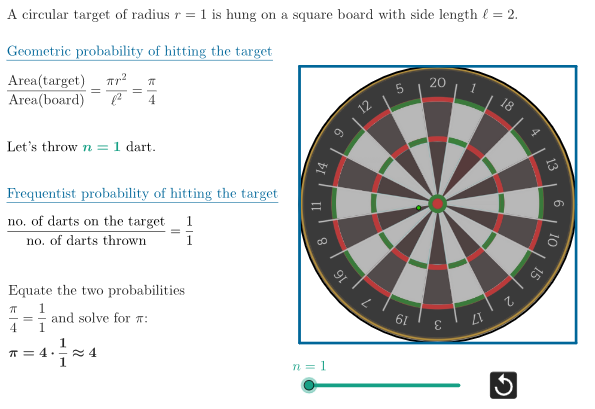
This GeoGebra example demonstrates how to estimate the value of π using experimental probability via the Monte Carlo method. It visualizes random points uniformly distributed in a square, and counts how many fall inside an inscribed circle. The ratio of points inside the circle to total points approximates the ratio of the circle's area to the square's area, which equals π/4. Core mathematical concepts include geometric probability, random sampling, and the law of large numbers. The construction uses commands such as Polygon to create the square, Sequence to generate random points, KeepIf to filter points inside the circle, Length to count them, and Midpoint to locate the circle's center. Interactive buttons (button1, button2) control the number of trials, a slider (rag) adjusts the sample size, and dynamic text displays the theoretical probability (probTheo), experimental probability (currentProb), and the estimated π (estimP). This is suitable for high school and university students learning probability, statistics, geometry, and numerical simulation, offering an intuitive introduction to stochastic methods and convergence.
GeoGebra Commands & Parameters
Polygon(A, B, 4) → quadrato, f, g, h, i, C, DSequence(RandomPointIn[quadrato], k, 1, quanteFrecc) → allPts, {(-0.13782417452966844, -0.022628721165734333)}KeepIf(IsInRegion[P, bersaglio], P, allPts) → allPtsInCircleLength(allPtsInCircle) → countInMidpoint(A, C) → KKeepIf(¬IsInRegion[P, bersaglio], P, allPts) → allPtsOutsideCircle
AI Drawing Prompt Reference
Draw a square with side length 4 units and an inscribed circle with radius half the side length of the square. Randomly generate a certain number of points uniformly distributed within the square. Then, count the number of points falling inside the circle. Estimate the ratio of the circle's area to the square's area, which equals π/4, based on the ratio of points inside the circle to total points.
The prompt above was compiled from the original drawing commands and is for reference only.