
Yahtzee Dice Simulation
Loading the math board and drawing, please wait…
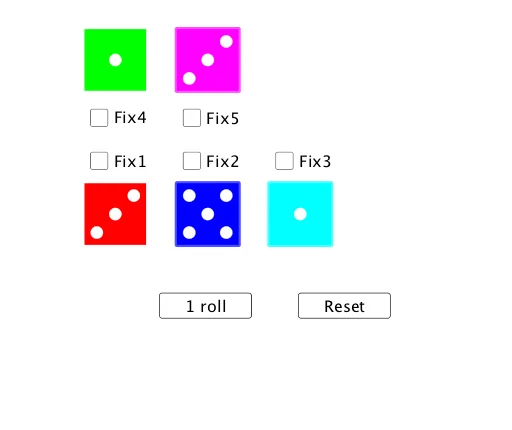
① This GeoGebra example simulates the dice-rolling process of the Yahtzee game, dynamically showing the outcomes of five dice and their statistical summaries. ② Core mathematical concepts include random experiments, probability and statistics, counting, and data visualization, focusing on frequency distributions of discrete random variables. ③ Construction highlights: uses GeoGebra commands such as Intersect, Point, Polygon, Circle, and Translate to draw and arrange dice faces; DotPlot and CountIf are used to visualize and count occurrences; TableText generates data tables; buttons (roll1button) trigger random rolls (roll1, roll2), and a slider n controls the number of trials. ④ Suitable for middle school or high school probability and statistics lessons, this interactive tool helps students understand the relationship between empirical frequency and theoretical probability, and can serve as a gamified teaching resource.
GeoGebra Commands & Parameters
Intersect(xAxis, yAxis) → APoint(xAxis) → BPolygon(A, B, 4) → poly1, f, g, h, i, C, DCircle(K, 1) → K1Circle(E, Radius[K1]) → E1Circle(F, Radius[K1]) → F1Circle(G, Radius[K1]) → G1Circle(L, Radius[K1]) → L1Circle(J, Radius[K1]) → J1Circle(H, Radius[K1]) → H1Translate(poly1, (15, 0)) → poly2Translate(K1, (15, 0)) → K2Translate(E1, (15, 0)) → E2Translate(F1, (15, 0)) → F2Translate(L1, (15, 0)) → L2Translate(J1, (15, 0)) → J2Translate(H1, (15, 0)) → H2DotPlot(wins, false, 0.2) → List1CountIf(x ≟ 0, wins) → zeroCountIf(x ≟ 50, wins) → fiftyCountIf(x ≟ 100, wins) → hunTableText({{"$0", "$50", "$100"}, {zero, fifty, hun}}, "c|h") → text4Translate(poly2, (15, 0)) → poly3Translate(poly1, (0, 25)) → poly4Translate(poly2, (0, 25)) → poly5Translate(K1, (30, 0)) → K3Translate(K1, (0, 25)) → K4Translate(K1, (15, 25)) → K5Translate(L1, (30, 0)) → L3Translate(L1, (0, 25)) → L4Translate(L1, (15, 25)) → L5Translate(J1, (30, 0)) → J3Translate(J1, (0, 25)) → J4Translate(J1, (15, 25)) → J5Translate(H1, (30, 0)) → H3Translate(H1, (0, 25)) → H4Translate(H1, (15, 25)) → H5Translate(G1, (15, 0)) → G2Translate(G1, (30, 0)) → G3Translate(G1, (0, 25)) → G4Translate(G1, (15, 25)) → G5Translate(F1, (30, 0)) → F3Translate(F1, (0, 25)) → F4Translate(F1, (15, 25)) → F5Translate(E1, (30, 0)) → E3Translate(E1, (0, 25)) → E4Translate(E1, (15, 25)) → E5
AI Drawing Prompt Reference
Create a dynamic simulation of dice rolling for a Yahtzee-like game, featuring five dice with faces represented by squares and circles. Draw each die using points, polygons, and circles, and display their face values. Incorporate a slider to control the number of rolls, and use a dot plot to visualize the frequency distribution of each outcome. Include a data table to show statistical summaries. Start by constructing one die, then replicate and translate it to form five dice. Visualize the frequency data with a dot plot and present counts in a text box. Add an interactive slider to control the simulation.
The prompt above was compiled from the original drawing commands and is for reference only.