
PR2-07-ET2: Like Terms Across Groups
Loading the math board and drawing, please wait…
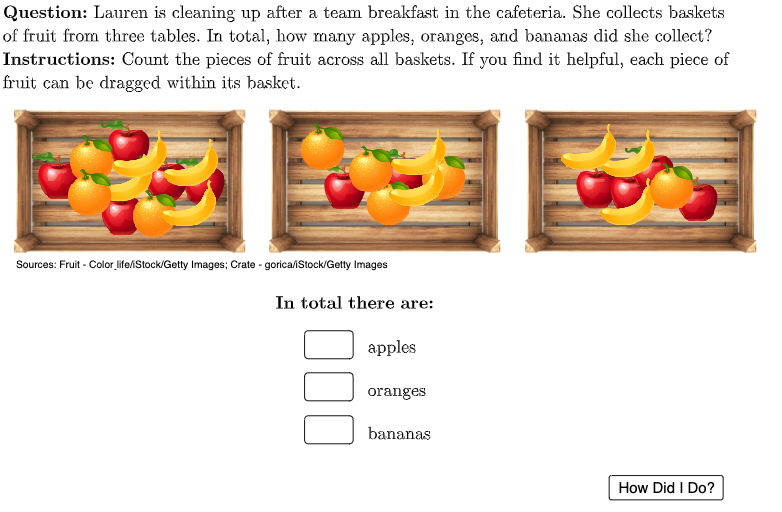
① This example demonstrates how to identify and combine like terms across different groups using three baskets of fruits (apples, oranges, bananas) as a visual metaphor. ② The core mathematical concept is algebraic simplification, focusing on combining like terms (same variable and exponent) from multiple groups, with additional statistical concepts like random variables and standard deviation as background context. ③ Construction details: Uses GeoGebra commands such as Polygon to draw basket shapes, PointIn and Join to place fruit images, Zip and Textfield for interactive input, TableText to display results; objects include variables like numBasket1/2/3bananas/oranges/apples and image objects like imgBasket*; LaTeX formulas show algebraic expressions. ④ Suitable for middle school to high school students learning algebraic simplification, and useful for teachers in classroom demonstrations or for self-paced practice, making abstract like-term rules tangible through visual grouping.
GeoGebra Commands & Parameters
LaTeX(UnicodeToLetter[10003]) → cmarkLaTeX(UnicodeToLetter[10007]) → xmarkPolygon({(-8, 2), (-8, 6.5), (1.5, 6.5), (1.5, 2)}) → basket1quadPointIn(basket1quad) → basket1apple1PointIn(basket1quad) → basket1apple2PointIn(basket1quad) → basket1apple3PointIn(basket1quad) → basket1apple4PointIn(basket1quad) → basket1apple5PointIn(basket1quad) → basket1orange1PointIn(basket1quad) → basket1orange2PointIn(basket1quad) → basket1orange3PointIn(basket1quad) → basket1banana1PointIn(basket1quad) → basket1banana2PointIn(basket1quad) → basket1banana3PointIn(basket1quad) → basket1banana4Polygon({(22, 2), (22, 6.5), (31.5, 6.5), (31.5, 2)}) → basket3quadPointIn(basket3quad) → basket3apple1PointIn(basket3quad) → basket3apple2PointIn(basket3quad) → basket3apple3PointIn(basket3quad) → basket3apple4PointIn(basket3quad) → basket3banana1PointIn(basket3quad) → basket3banana2PointIn(basket3quad) → basket3banana3PointIn(basket3quad) → basket3orange1Join({Sequence[(("SetLayer(imgBasket1apple" * q) * ", 8)"), q, 1, numBasket1apples], Sequence[(("SetLayer(imgBasket1orange" * q) * ", 8)"), q, 1, numBasket1oranges], Sequence[(("SetLayer(imgBasket1banana" * q) * ", 8)"), q, 1, numBasket1bananas]}) → basket1LayerCommandsJoin({Sequence[(("SetLayer(imgBasket2apple" * q) * ", 8)"), q, 1, numBasket2apples], Sequence[(("SetLayer(imgBasket2orange" * q) * ", 8)"), q, 1, numBasket2oranges], Sequence[(("SetLayer(imgBasket2banana" * q) * ", 8)"), q, 1, numBasket2bananas]}) → basket2LayerCommandsJoin({Sequence[(("SetLayer(imgBasket3apple" * q) * ", 8)"), q, 1, numBasket3apples], Sequence[(("SetLayer(imgBasket3orange" * q) * ", 8)"), q, 1, numBasket3oranges], Sequence[(("SetLayer(imgBasket3banana" * q) * ", 8)"), q, 1, numBasket3bananas]}) → basket3LayerCommandsPolygon({(7, 2), (7, 6.5), (16.5, 6.5), (16.5, 2)}) → basket2quadPointIn(basket2quad) → basket2apple1PointIn(basket2quad) → basket2apple2PointIn(basket2quad) → basket2banana1PointIn(basket2quad) → basket2banana2PointIn(basket2quad) → basket2orange1PointIn(basket2quad) → basket2orange2PointIn(basket2quad) → basket2orange3PointIn(basket2quad) → basket2orange4LaTeX((((("\text{" * QUESTION) * "\\") * INSTRUCTIONS) * "}")) → TEXTZip(A ≟ Text[B], A, {textApples, textOranges, textBananas}, B, {totalApples, totalOranges, totalBananas}) → totalCorrectnessLaTeX("\textbf{In total there are:}") → headerTextfield(textApples) → ansBoxApplesTextfield(textBananas) → ansBoxBananasTextfield(textOranges) → ansBoxOrangesTableText({totalApples, totalOranges, totalBananas}, {"\text{\vphantom{\dfrac{1}{2}}apples}", "\text{\vphantom{\dfrac{1}{2}}oranges}", "\text{\vphantom{\dfrac{1}{2}}bananas}"}, If[isChecked, Zip[If[A, (("\textcolor{#254117}{" * cmark) * "}"), (("\textcolor{#e41b17}{" * xmark) * "}")], A, totalCorrectness]], "v") → table
AI Drawing Prompt Reference
Draw three fruit baskets, each represented by a quadrilateral, containing different quantities and types of fruits: apples, oranges, and bananas. Use points to represent each fruit, randomly placed inside the baskets. Add text labels to show the total count of each fruit, highlighting correct and incorrect counts with different colors. Finally, present a table summarizing the total number of fruits in all baskets, with the title 'In total there are:'.
The prompt above was compiled from the original drawing commands and is for reference only.