
Subtraction Up to 10 via Random Geometric Sequences
Loading the math board and drawing, please wait…
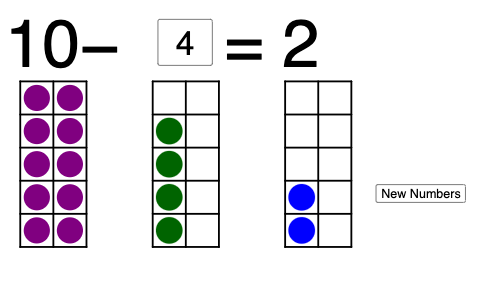
This GeoGebra example demonstrates how “subtraction up to 10” can be visualized dynamically using randomly generated geometric constructions. Instead of treating subtraction only as symbols, the model uses a sequence of constructed objects (points and circles) together with text fields to present difference-related outcomes as the geometry updates. Key mathematical ideas include: the meaning of subtraction as a difference, iterative/algorithmic construction of objects via Sequence, and randomized parameter generation via Random. Construction highlights from the provided command summary: Sequence is used to generate structured repeated elements (e.g., l1–l7 and other sequence-labeled objects), Circle is used to create circular geometric constraints and graphics (c1–c6), Textfield supports on-screen labeling or input/output display for the subtraction-related expressions/results, and Random drives the generation of points/parameters (A through Q, plus associated a1–a10 and c-labeled markers). The result is an interactive learning activity suitable for early middle school and enrichment use, helping students build number sense and connect arithmetic operations with visual geometric feedback.
GeoGebra Commands & Parameters
Sequence(Segment[(a, 0), (a, 5)], a, 0, 2) → l1Sequence(Segment[(a + 4, 0), (a + 4, 5)], a, 0, 2) → l2Sequence(Segment[(a + 8, 0), (a + 8, 5)], a, 0, 2) → l3Sequence(Segment[(0, a), (2, a)], a, 0, 5) → l4Sequence(Segment[(4, a), (6, a)], a, 0, 5) → l5Sequence(Segment[(8, a), (10, a)], a, 0, 5) → l6Sequence(Sequence[(a, b), a, 0.5, 1.5, 1], b, 0.5, 4.5, 1) → l7Circle(A, 0.4) → a1Circle(B, Radius[a1]) → a2Circle(C, Radius[a2]) → a3Circle(D, Radius[a3]) → a4Circle(E, Radius[a4]) → a5Circle(F, Radius[a5]) → a6Circle(G, Radius[a6]) → a7Circle(H, Radius[a7]) → a8Circle(I, Radius[a8]) → a9Circle(J, Radius[a9]) → a10Circle(K, Radius[a10]) → c1Circle(L, Radius[c1]) → c2Circle(M, Radius[c2]) → c3Circle(N, Radius[c3]) → c4Circle(O, Radius[c4]) → c5Circle(P, Radius[c5]) → c6Circle(Q, Radius[c6]) → c7Circle(R, Radius[c7]) → c8Circle(S, Radius[c8]) → c9Circle(T, Radius[c9]) → c10Textfield(n) → InputBox1Random(1, 9) → a
AI Drawing Prompt Reference
This is a dynamic geometric figure that visualizes 'subtraction up to 10' using randomly generated geometric constructions. The figure includes a series of vertical line segments, horizontal line segments, and a sequence of circles. The radius of each circle increases based on the previous circle's radius, forming a gradually expanding circular sequence. There are also text boxes to display subtraction-related expressions and results. Users can adjust parameters to observe changes in the figure, helping to understand the concept of subtraction. This figure is suitable for early middle school mathematics teaching, helping students build number sense and connect arithmetic operations with visual feedback.
The prompt above was compiled from the original drawing commands and is for reference only.