
Volumes and Geometry Visualization: Intersections of Curves and Surfaces
Loading the math board and drawing, please wait…
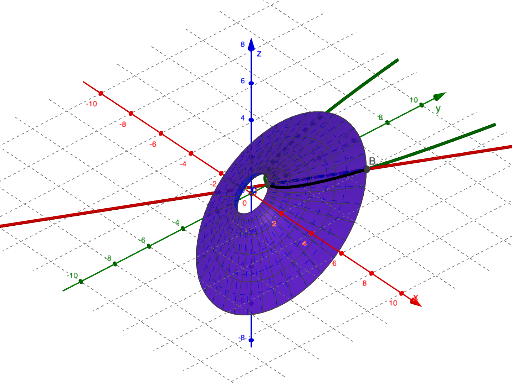
This example visualizes geometry in 3D by using intersections among Cartesian curves, lines, and constructed surfaces, aiming to illustrate volume-related geometric relationships through a clear graphical setup. The key math concepts include Cartesian graphing of curves (CurveCartesian), computing intersection points/sets between curves, lines, and surfaces (Intersect), and building solid-geometry structures via parametric-like function surfaces and boundary curves. Construction highlights, derived from the provided GeoGebra summary: it employs the commands Intersect, CurveCartesian, Line, and Surface, and uses function objects f and g together with multiple geometric entities (A, B, a, b, C, D, h, c, d) to define the interacting curve/edge/frame components that determine the resulting surface geometry. Suitable for advanced middle school through early university learners studying solid geometry, coordinate geometry, and function-based visualization.
GeoGebra Commands & Parameters
Intersect(f, g) → A, BCurveCartesian(t, f(t), 0, t, 0, 2) → aCurveCartesian(t, g(t), 0, t, 0, 2) → bLine((0, -1, 0), (1, -1, 0)) → hSurface(a, 360°, xAxis) → cSurface(b, 360°, xAxis) → d
AI Drawing Prompt Reference
Create a 3D visualization with two Cartesian curves and their resulting surfaces. First, draw one curve parameterized by t from 0 to 2 using points (t, f(t), 0), and draw a second curve using points (t, g(t), 0). Compute the intersection points between these two curves to show where they meet. Add a fixed line that lies in the plane y = -1 and runs along the x-direction from (0, -1, 0) to (1, -1, 0), to serve as the rotation/reference axis. Finally, revolve each curve 360° around the x-axis (using that axis setting) to form two distinct surfaces, one from each curve, for a clear geometry and volume-related setup.
The prompt above was compiled from the original drawing commands and is for reference only.