
Interactive Exploration of Sphere Volume as Radius Changes
Loading the math board and drawing, please wait…
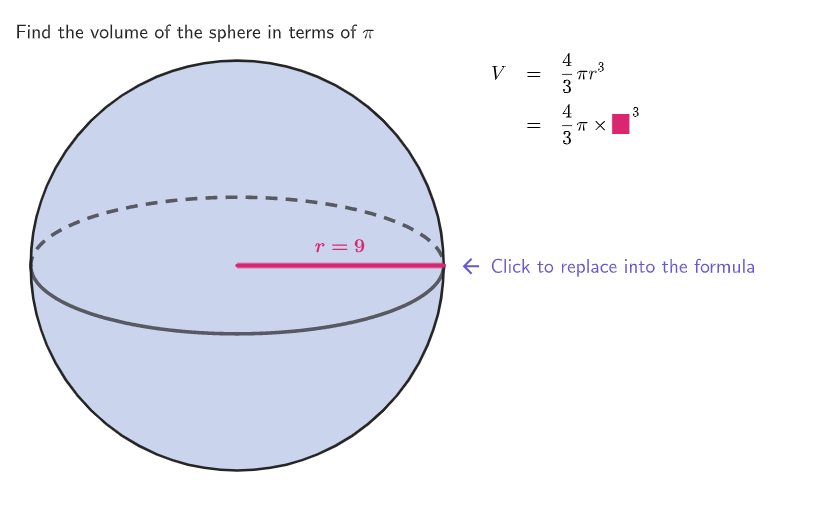
This GeoGebra lesson demonstrates how changing a sphere’s radius affects the computed volume, showing both the 3D context and the updated numeric results. It centers on the sphere volume formula V = (4/3)·π·r^3, treating radius r as a parameter that drives a functional relationship, and emphasizing substitution and order of operations (power first, then multiply by the coefficient and π). Construction is built around a variable radius and linked outputs: the construct summary indicates key tools such as Circle for the geometric representation, Segment/Element for supporting geometry and selection, TableText and Text for displaying formula/result text, and interactive/sequence features (Shuffle, Sequence) alongside objects like rads, r, and radGraph. It also includes user actions (e.g., calculate/replace-variable controls) and on-screen calculation/feedback text. Best suited for middle school (grades 6–8) solid geometry and word-problem practice on volume (and related surface area skills).
GeoGebra Commands & Parameters
Shuffle({1 / 4, 1 / 2, 3 / 4, 1, 3 / 2, 2, 3, 6, 9, 12, 15}) → rads, {0.5, 9, 0.75, 2, 3, 15, 1, 6, 0.25, 1.5, 12}Sequence(5) → l1Element(rads, Mod[example, Length[rads]] + 1) → rCorner(5) → ASegment((0, 0), (radGraph, 0)) → honboardingTextOffset(Corner[onboardingText_{1}, 1], Corner[onboardingText_{1}, 3], onboardingCase_{1}, Corner[1], Corner[3], Corner[5]) → OnboardingTextOffset_{1}expandSegment(Vertex[h, 1], Vertex[h, 2], (7 * pulsing), Corner[1], Corner[3], Corner[5]) → pulsingObjectCircle((0, 0), radGraph) → cCircle((0, 0), radGraph) → dTableText(First[{{"V", "=", row1}, {"", "=", row2}, {"", "=", row3}, {"", "=", row4}, {"", "=", row5}, {"", "=", row6}}, Max[stage, 2]], "l", 10, 50) → equatText(("r=" * FractionText[r]), Midpoint[h], true, true, 0, 1) → text1
AI Drawing Prompt Reference
Create a plane visualization of a changing sphere radius using a radius-based circle setup. Draw a coordinate origin and construct two concentric circles centered at the origin whose radii are controlled by a single variable parameter r. Add a supporting line segment from the origin toward a point on the circle to indicate the current radius direction. Include a horizontal/height-style segment associated with this radius context, and place on-screen text that displays the current value of r in fractional form. Finally, add a formula text block showing the volume relationship V = (4/3)·π·r^3, positioned so the changing r value is clearly connected to the displayed formula.
The prompt above was compiled from the original drawing commands and is for reference only.