
Multiplying Binomials with Area Models
Loading the math board and drawing, please wait…
GeoGebra Commands & Parameters
Corner(5) → AppSizeTranslate(A, ((hor1, 0) * xwidth)) → BTranslate(B, (hor2, 0)) → CTranslate(A, ((0, ver1) * xwidth)) → DTranslate(D, (0, ver2)) → GPolygon({A, D, E, B}) → q1Polygon({B, E, F, C}) → q2Polygon({D, G, H, E}) → q3Polygon({E, H, I, F}) → q4Polynomial((hor1 * x)) → lin1Polynomial((-((ver1 * x)))) → lin2Translate(A, (0, trans)) → A'Translate(B, (0, trans)) → B'Translate(C, (0, trans)) → C'Translate(A, ((-trans), 0)) → A'_{1}Translate(D, ((-trans), 0)) → D'Translate(G, ((-trans), 0)) → G'Segment(A', B') → seg1Segment(B', C') → seg2Segment(A'_{1}, D') → segV1Segment(D', G') → segV2Text(lin1, Midpoint[seg1], true, true, 0, 1) → lin1TextText(lin2, Midpoint[segV1], true, true, -1, 0) → lin2TextText(hor2, Midpoint[seg2], true, true, 0, 1) → ind1Text((-ver2), Midpoint[segV2], true, true, -1, 0) → ind2Polynomial((lin1(x) * lin2(x))) → A1Text(A1, Midpoint[A, E], true, true, 0, 0) → area1TextPolynomial((hor2 * lin2(x))) → A2Text(A2, Midpoint[B, F], true, true, 0, 0) → area2TextPolynomial(((-ver2) * lin1(x))) → A3Text(A3, Midpoint[D, H], true, true, 0, 0) → area3TextText(((-hor2) * ver2), Midpoint[E, I], true, true, 0, 0) → area4TextPolynomial(lin1(x) + hor2) → fac1Polynomial(lin2(x) - ver2) → fac2Polynomial((fac1(x) * fac2(x))) → ResulText(text9, Midpoint[Cor1, (x(Cor3), y(Cor1))], true, true, 0, 1) → text10
AI Drawing Prompt Reference
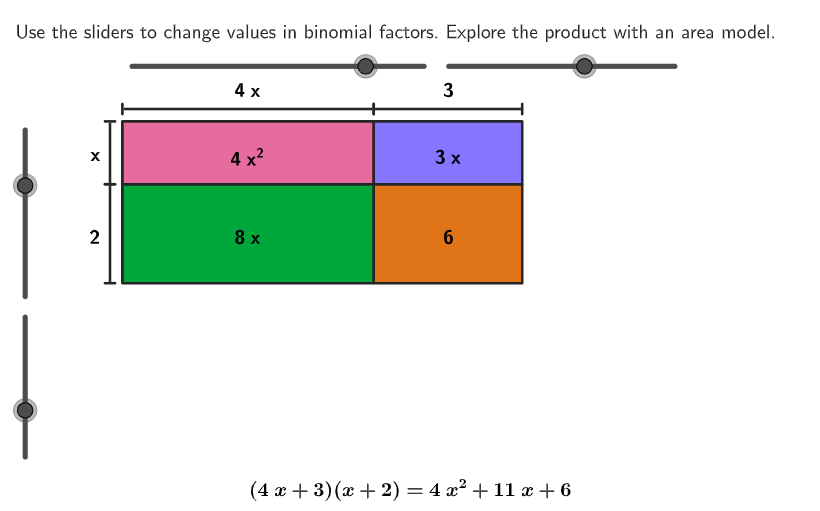
Draw an area model to demonstrate the multiplication of two binomials. Start by creating a rectangle and dividing it into four smaller rectangular areas, each filled with the corresponding product term. Then, use lines to represent the coefficients of the binomials and label them appropriately. Finally, use text objects to label the product terms in each small rectangular area and display the final polynomial result.
The prompt above was compiled from the original drawing commands and is for reference only.