
Absolute Value Functions as Piecewise Functions
Loading the math board and drawing, please wait…
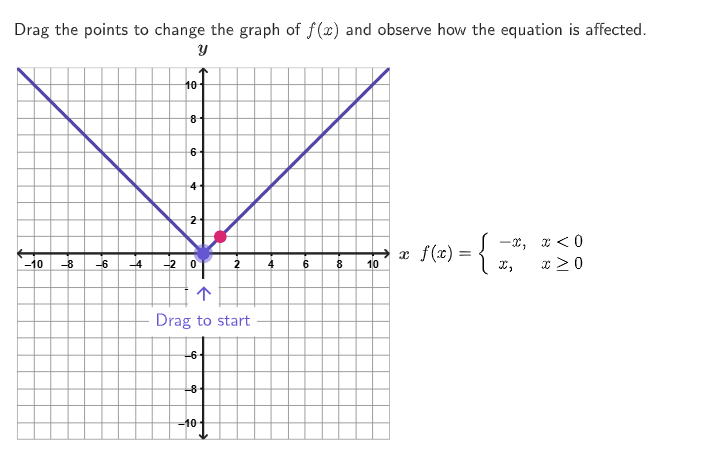
This example demonstrates how absolute value functions can be represented as piecewise functions through dynamic graph changes. Key mathematical concepts include absolute value functions, vertex coordinates, and inequality solving. Construction involves GeoGebra commands like Polygon, PointIn, and Segment. Suitable for high school (GR. 9-12) math teaching to reinforce understanding of function graphs and algebraic relationships.
GeoGebra Commands & Parameters
Polygon({(-9, -10), (9, -10), (9, 10), (-9, 10)}) → moveBoxPointIn(moveBox) → PVertexPointToPixels((xMin, yMin), (xMax, yMax), layoutAppSize, (0, -1)) → onboardingPXElement({{onboardingX + 24, onboardingY - 12, 1, 0}, {onboardingX, onboardingY - 12, -1, 0}, {onboardingX - 18, onboardingY + 18, 0, -1}, {onboardingX + 18, onboardingY - 36, 0, 0}}, onboardingCase) → onboardingPositionsPolygon({(-11, 11), (-11, -11), (11, -11), (11, 11)}) → viewboxexpandCircle(PVertex, 7 + (7 * pulsing), (xMin, yMin), (xMax, yMax), (800, 500)) → pulsingPointPolygon({(-0.9, -3.5), (0.9, -3.5), (0.9, -1.5), (-0.9, -1.5)}) → onboardingBackgroundSegment((-10.95, 0), (10.95, 0)) → axisXSegment((0, -10.95), (0, 10.95)) → axisYText("\text{Drag to start}", (0, -3), true, true, 0, -1) → onboardingTextPolygon({(-11, 11), (-11, -11), (11, -11), (11, 11)}) → gridBorderText("x", (11, 0.1), true, true, 1, 0) → lblXText("y", (0, 11), true, true, 0, 1) → lblY
AI Drawing Prompt Reference
Create a dynamic teaching graphic showing how absolute value functions can be represented as piecewise functions. Start with a large rectangular region as a movable area, containing a draggable vertex point. Around this vertex, place a small pulsing circle that scales with an animation. Draw horizontal and vertical coordinate axes across the plane, labeling them with x and y. Add a small text box in the center saying 'Drag to start', with a background rectangle. Enclose the entire scene within a larger border rectangle to define the visible area.
The prompt above was compiled from the original drawing commands and is for reference only.