
Open Middle: Graphing Linear Inequalities (1)
Loading the math board and drawing, please wait…
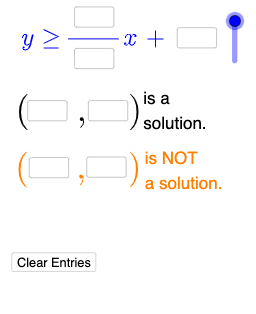
This GeoGebra example is an interactive open-middle exercise designed for students to explore the graphical representation of linear inequalities. It demonstrates how inequalities of the form ax+by>c or ax+by≤c are plotted as half-planes on the coordinate plane, with attention to whether the boundary line is solid or dashed and which side is shaded. The core mathematical concepts include linear inequalities, half-planes, boundary lines, feasible regions, and the effect of inequality symbols on the solution set. In terms of construction, the summary reveals the use of commands such as Textfield, Mode, and If, along with multiple input boxes (InputBox1 through InputBox10) and variables a, b, c, etc., allowing dynamic adjustment of coefficients and constants. A button (button1) and various text objects (text1, text2, etc.) are included, likely for checking answers or providing feedback. This resource is suitable for middle or high school algebra and geometry classes, serving as a classroom exploration or homework task to help students understand graphing linear inequalities through hands-on manipulation and develop mathematical reasoning from concrete examples to abstract rules.
GeoGebra Commands & Parameters
Textfield(a) → InputBox1Textfield(b) → InputBox2Textfield(c) → InputBox3Textfield(d) → InputBox4Textfield(e) → InputBox5Textfield(f) → InputBox6Textfield(g) → InputBox7Textfield(h) → InputBox8Textfield(i) → InputBox9Textfield(j) → InputBox10Mode(l1) → l2If(Length[l2] ≟ 0, "No digits repeat.", "Repeated digits exist.") → text4If(l ≟ 1, "≤", "≥") → text5If(l ≟ 1, y ≤ p(x), y ≥ p(x)) → mIf(IsInRegion[k, m], "√", "X") → text6If(¬IsInRegion[A, m], "√", "X") → text7
AI Drawing Prompt Reference
Draw a dynamic straight line and its corresponding half-plane region on the coordinate plane. Create coordinate axes and a grid, then use multiple input fields to input coefficients that determine the line's equation. Depending on the selected inequality type (less than or equal to, or greater than or equal to), represent the boundary line as solid or dashed, and shade the appropriate side of the line to show the solution region. Include a movable test point to verify whether it falls within the half-plane defined by the inequality, and display the verification result using checkmark or cross symbols.
The prompt above was compiled from the original drawing commands and is for reference only.