
Perpetual Calendar via Modular Arithmetic and Table Construction
Loading the math board and drawing, please wait…
In collections
Earth and Sun
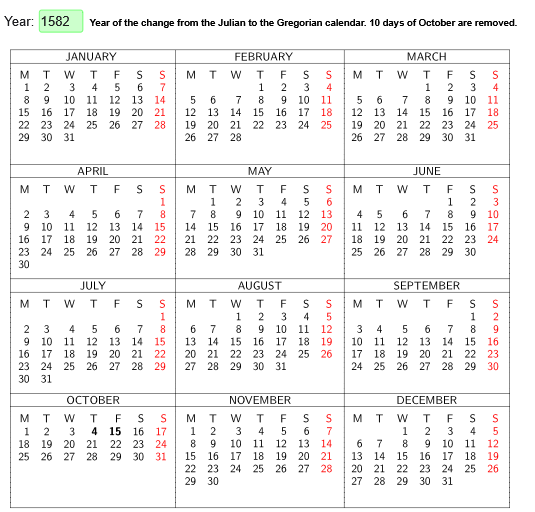
This example demonstrates how to build an interactive perpetual calendar that determines date-related information (e.g., weekday/period positions) for arbitrary inputs using periodic rules rather than a fixed year. The key mathematical ideas are modular arithmetic (Mod) to model repeating cycles, sequences (Sequence) to generate ordered indices and intermediate quantities, and conditional logic (If) to select outcomes for different month/date cases. Construction-wise, the example is driven by GeoGebra components and commands: Textfield for user input, Mod for cycle computation, If for branching logic, Sequence for producing structured lists of values, and TableText to render the computed results into calendar cells laid out as a diagram (objects such as the calendar grid/table—e.g., cuadro/calendario and related cell objects). Suitable for middle school through early university students, and useful for teaching discrete mathematics, algorithmic reasoning, and interactive visualization with GeoGebra.
GeoGebra Commands & Parameters
Textfield(a) → CasillaDeEntrada1If(IsInteger[a / 400] ∨ IsInteger[a / 4] ∧ (¬IsInteger[a / 100]) ∧ a ≠ 4, 1, 0) → bMod((a < 4) + 1 - b + If[a < 1583, Mod[11 - If[a < 1583, Mod[c, 7], Mod[c, 4]], 7], 6 - (2 * If[a < 1583, Mod[c, 7], Mod[c, 4]])] + Mod[a - (100 * c), 28] + floor(Mod[a - (100 * c), 28] / 4), 7) → e1Sequence({{1, 2, 3, 4, 5, 6, 7} - Mod[k + e, 7], {1, 2, 3, 4, 5, 6, 7} - Mod[k + e, 7] + 7, {1, 2, 3, 4, 5, 6, 7} - Mod[k + e, 7] + 14, {1, 2, 3, 4, 5, 6, 7} - Mod[k + e, 7] + 21, {1, 2, 3, 4, 5, 6, 7} - Mod[k + e, 7] + 28, {1, 2, 3, 4, 5, 6, 7} - Mod[k + e, 7] + 35}, k, 0, 6) → mSequence(TableText[Join[{{D}, Sequence[Sequence[If[j ≟ 7, r, ""] + (If[m(o(k), i, j) < 1 ∨ m(o(k), i, j) > 31 - f(k), w, ""]) + (If[m(o(k), i, j) < 1, 0, m(o(k), i, j)]), j, 1, 7], i, 1, 6]}], "rc"], k, 1, 12) → tTableText({" JANUARY ", " FEBRUARY ", " MARCH "}, {}, {}, {}, {}, {}, {}, {}, {}, {}, {}, {}, {}, {}, {"APRIL", "MAY", "JUNE"}, {}, {}, {}, {}, {}, {}, {}, {}, {}, {}, {}, {}, {}, {}, {}, {}, {}, {}, {}, {}, {}, {}, {"JULY", "AUGUST", "SEPTEMBER"}, {}, {}, {}, {}, {}, {}, {}, {}, {}, {}, {}, {}, {}, {}, {}, {}, {}, {}, {}, {}, {}, {}, {"OCTOBER", "NOVEMBER", "DECEMBER"}, {}, {}, {}, {}, {}, {}, {}, {}, {}, {}, {}, {}, {}, {}, {}, {}, {}, {}, {}, {}, {}, {}, "c | _1100000000000000000001100000000000000000001100000000000000000001100000000000000000001", {}) → cuadroTableText(Join[{{D}, {{"1", "2", "3", "\textbf{4}", "\textbf{15}", "16", (r * "17")}, {"18", "19", "20", "21", "22", "23", (r * "24")}, {"25", "26", "27", "28", "29", "30", (r * "31")}}}], "rc") → M10'TableText(Join[{{D}, {{"1", "2", "3", "4", "5", "6", (r * "7")}, {"8", "9", "10", "11", "12", "13", (r * "14")}, {"15", "16", "17", "18", "19", "20", (r * "21")}, {"22", "23", "24", "25", "26", "27", (r * "28")}, {"29", "30", (w * 0), (w * 0), (w * 0), (w * 0), (w * 0)}}}], "rc") → M11'
AI Drawing Prompt Reference
Create an interactive perpetual calendar with twelve monthly grids, each having six rows and seven columns showing date numbers. Include an input box for the year at the top. The first day of each month is calculated based on the year, and dates are arranged accordingly. Highlight specific dates like 4, 15, and 31 in bold or with special marks. Add month titles such as January, February, etc., around the grids. The overall layout should be clean and suitable for educational demonstration.
The prompt above was compiled from the original drawing commands and is for reference only.