
Random Simplify Square-Root Flash Cards
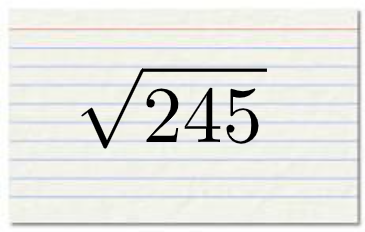
Loading the math board and drawing, please wait…
This example demonstrates a flash-card style workflow for simplifying square roots (radicals). Students see randomly generated radical expressions and practice converting them into simpler standard forms by using properties of square roots, factoring the radicand, and reducing like terms. The construction uses GeoGebra commands such as RandomElement to generate the parameters (e.g., a, b, c, etc.) and Simplify to automatically compute the simplified radical form. Random controls the variability between problems, while text objects (e.g., text1, text2) and supporting graphical elements (e.g., pic1) help present the generated question and its result for quick comparison. Suitable for middle school to high school algebra and radical simplification practice, as well as classroom drills and self-checking.
GeoGebra Commands & Parameters
RandomElement(Sequence[u^(2), u, 2, 10]) → aRandomElement(Sequence[u, u, 2, 10]) → bSimplify(sqrt((a * b))) → fRandom(0, 1) → d
AI Drawing Prompt Reference
Create a random square root simplification problem. First, randomly select a square number between 2 and 10 as the base u squared, then randomly choose a number between 2 and 10 as b. Calculate the square root of their product and simplify the result. Finally, generate a random number d between 0 and 1 to control the variability of the problem.
The prompt above was compiled from the original drawing commands and is for reference only.