
Reading Exponents Correctly: Interactive Practice with Positive Integer Powers
Loading the math board and drawing, please wait…
In collections
Potenzen - Einführung
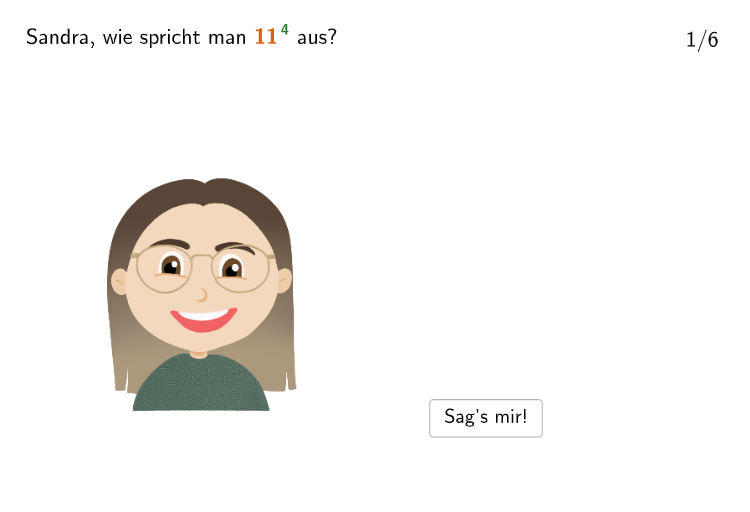
This GeoGebra activity uses an interactive questioning interface to help students practice and correct how to read exponent expressions with positive integer exponents. It features tasks such as identifying an incorrect reading (e.g., a power like 47 written as “seven to the fourth”), and then giving correct alternative wordings for expressions such as 5^2 and 8^3. The underlying math concepts are the meaning of powers: for positive integer exponents, a^n represents repeated multiplication of the same base a, n times; therefore the spoken form must reflect the exponent correctly (e.g., “the base to the power of the exponent”). Construction and interactivity rely on: Shuffle to generate random bases and exponents (randomNosForBasis/randomNosForExponent, including no-repeat variants), Textfield and Text to display prompts and user inputs, SpeechBubble (PBubble/PBubble2) for feedback, and dedicated variables/objects such as Basis and Exponent along with InputBox/input fields. It is suitable for grades 7–8 and can be used for in-class practice, differentiation, or formative assessment of exponent interpretation and verbal expression.
GeoGebra Commands & Parameters
Shuffle(Sequence[Random[1, 20], i, 1, 100]) → randomNosForBasis, {6, 11, 4, 11, 13, 20, 6, 17, 16, 14, 7, 17, 13, 5, 17, 15, 20, 15, 1, 8, 1, 18, 10, 9, 12, 20, 17, 2, 15, 10, 12, 11, 16, 3, 4, 12, 15, 1, 3, 7, 14, 14, 1, 15, 20, 20, 6, 15, 11, 8, 8, 1, 1, 20, 16, 20, 10, 7, 4, 19, 14, 18, 3, 11, 18, 20, 12, 6, 13, 17, 9, 17, 17, 3, 16, 5, 2, 15, 3, 6, 16, 6, 5, 15, 2, 15, 5, 1, 7, 2, 5, 5, 7, 2, 3, 1, 12, 15, 16, 6}Append(true, Sequence[If[randomNosForBasis(i) ≟ randomNosForBasis(i - 1), false, true], i, 2, 100]) → stayXShuffle(Sequence[Random[2, 9], i, 1, 100]) → randomNosForExponent, {6, 4, 5, 7, 4, 3, 9, 7, 4, 3, 8, 6, 6, 2, 7, 3, 5, 2, 2, 6, 9, 6, 5, 9, 4, 5, 6, 7, 4, 2, 3, 4, 6, 7, 5, 2, 5, 5, 3, 4, 2, 5, 9, 6, 2, 4, 6, 3, 9, 3, 3, 2, 3, 6, 7, 4, 2, 5, 7, 6, 4, 3, 5, 2, 5, 2, 5, 8, 8, 9, 6, 9, 7, 5, 3, 6, 2, 5, 8, 5, 2, 3, 8, 2, 2, 6, 9, 6, 5, 7, 9, 7, 9, 2, 9, 3, 6, 4, 2, 7}Append(true, Sequence[If[randomNosForExponent(i) ≟ randomNosForExponent(i - 1), false, true], i, 2, 100]) → stayYRemove(Sequence[If[stayX(i), randomNosForBasis(i), 0], i, 1, 100], Sequence[0, i, 1, 100]) → randomNosForBasiswithoutRepeatRemove(Sequence[If[stayY(i), randomNosForExponent(i), 0], i, 1, 100], Sequence[0, i, 1, 100]) → randomNosForExponentwithoutRepeatElement(randomNosForBasiswithoutRepeat, Mod[questionCount, Length[randomNosForBasiswithoutRepeat]] + 1) → BasisElement(randomNosForExponentwithoutRepeat, Mod[questionCount, Length[randomNosForExponentwithoutRepeat]] + 1) → ExponentTextfield(input1) → InputBox1Textfield(input2) → InputBox2Textfield(input3) → InputBox3SpeechBubbleLeft(PBubble, abs_{1}, 1.4) → poly1SpeechBubbleLeft(PBubble2, 6, 2) → poly2
AI Drawing Prompt Reference
Create an interactive mathematical practice interface displaying random power expressions such as 5 to the second power or 8 to the third power. Include a formula area showing the base and exponent, text prompts asking students how to correctly read each power, input text boxes for student answers, and speech bubbles for displaying feedback and correct responses.
The prompt above was compiled from the original drawing commands and is for reference only.