
Geometric Construction with Circles and Angles: Mirror and Angle Bisector
Loading the math board and drawing, please wait…
In collections
Poorly Drawn Parallelograms 3
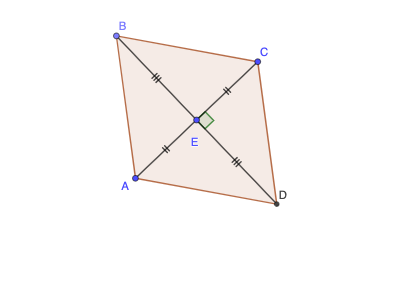
This example demonstrates how to build a structured geometric figure using symmetry and classic construction steps. Starting from given points and circle/line elements, it uses mirror transformations, angle bisectors, intersection points, and polygon/segment assembly to reveal a consistent configuration. The main concepts include circle geometry, geometric transformations (Mirror), the defining property of an angle bisector (equal angles), and constructing new entities from intersecting primitives. Construction ingredients extracted from the given setup: Circle to create circles; Mirror to generate reflected objects; LineBisector to draw an angle bisector; Point and Intersect to define key points and intersection results; and Segment and Polygon to connect elements into the final diagram, with Angle for the angle-related structure. Suitable for middle/high school geometry lessons on construction, symmetry, and angle bisectors, and useful for geometry modeling practice.
GeoGebra Commands & Parameters
Circle(E, A) → cMirror(A, E) → CLineBisector(A, C) → fPoint(f) → BCircle(E, B) → dIntersect(d, f, 2) → DPolygon(D, A, B, C) → q1, d_1, b, c_1, b'Segment(B, E) → gSegment(E, C) → hSegment(E, D) → iSegment(E, A) → jAngle(D, E, C) → α
AI Drawing Prompt Reference
Construct a symmetric circle-based geometry figure: choose three given points so that one point serves as the center of a circle passing through another given point. Use a mirror relationship between the remaining points to create the reflected configuration that determines the symmetric structure. Form an angle using two rays defined by the key points, then construct its angle bisector. Create a second circle with the same center and passing through the point on the angle bisector, and take the intersection of this circle with the bisector to obtain the main intersection point. Connect the resulting intersection point with the earlier symmetric points to assemble a polygon and add several segments linking the center to the key points, and label the angle formed by the two rays.
The prompt above was compiled from the original drawing commands and is for reference only.