
Miquel Point of a Cyclic Complete Quadrilateral: Orthogonal Circles via a Midpoi
Loading the math board and drawing, please wait…
In collections
Besondere Punkte/Special Points
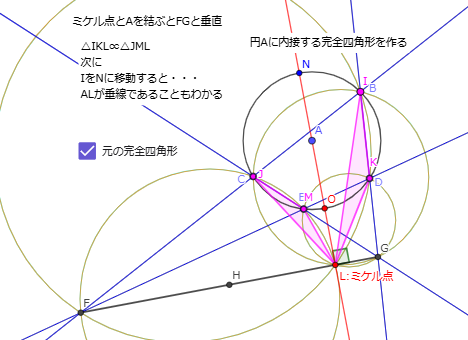
This example demonstrates a geometric configuration where, for a cyclic “complete quadrilateral” inside a circle, the Miquel point becomes the key to establishing an orthogonality (perpendicularity) relation between two circles. The construction highlights core concepts: Miquel point structures, midpoint-based circle construction, and the criterion that two circles are orthogonal, which can be confirmed by showing the relevant angles become right angles. In GeoGebra, you build a circle centered at the midpoint H of segment FG using Circle and Midpoint, then create the second circle (e.g., the original circle A). With Point, Line, Segment, and Intersect you determine the needed vertices and intersection points, while OrthogonalLine and Angle help verify the orthogonality/90° condition. Polygon is used to manage the quadrilateral’s vertex relations and Angle is used for the decisive angle check. Suitable for high-school advanced geometry and pre-university proof-oriented dynamic geometry lessons.
GeoGebra Commands & Parameters
Circle(A, 1) → cPoint(c) → BPoint(c) → CPoint(c) → DPoint(c) → ELine(B, C) → fLine(B, D) → gLine(D, E) → hLine(C, E) → iIntersect(f, h) → FIntersect(g, i) → GSegment(F, G) → jMidpoint(F, G) → HCircle(E, D, G) → dCircle(C, E, F) → eCircle(B, C, G) → pCircle(F, D, B) → qOrthogonalLine(A, j) → aIntersect(c, a, 1) → OIntersect(a, j) → LPoint(c) → ILine(I, F) → kLine(I, G) → lIntersect(c, k, 2) → JLine(J, G) → mIntersect(c, l, 2) → KLine(K, F) → nIntersect(n, m) → MPolygon(I, K, L) → t3, l_3, i_1, k_1Polygon(J, M, L) → t4, l_4, j_1, m_1Circle(F, J, M) → rCircle(F, I, K) → sCircle(G, M, K) → tCircle(G, J, I) → c_1Intersect(c, a, 2) → NAngle(G, L, N) → αCircle(H, G) → d_1Segment(J, H) → f_1Segment(J, A) → g_1
AI Drawing Prompt Reference
Draw a circle and place five points on it. Connect four of these points to form a complete quadrilateral, and extend opposite sides to meet at two external points. Connect these two intersection points with a segment, and take its midpoint as the center of a new circle passing through one of the original points. Construct four circles each passing through three specific points among the vertices and intersections. Draw a line through the original circle's center perpendicular to the segment, intersecting the original circle at two points. Choose another point on the circle, connect it to the two external points, and extend these lines to meet the circle again, forming two triangles. Finally, construct four more circles through triples of these points, and verify that two of the circles are orthogonal by checking that the relevant angle is a right angle.
The prompt above was compiled from the original drawing commands and is for reference only.