
Miquel Point of an Inscribed Complete Quadrilateral: A Perpendicularity Proof
Loading the math board and drawing, please wait…
In collections
Besondere Punkte/Special Points
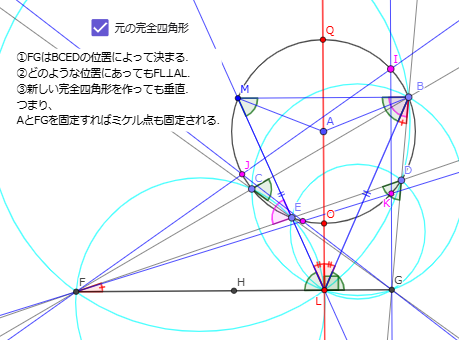
This example uses dynamic geometry to demonstrate a perpendicularity result for the Miquel point of an inscribed complete quadrilateral, confirming the stated right-angle relationship through a rigorous construction workflow. It centers on key ideas: complete quadrilateral geometry (four lines forming six intersection points), the Miquel point (a special point determined by the cyclic/angle conditions of the configuration), and circle/line intersection to locate the relevant point and structure. The construction is carried out with GeoGebra commands such as Circle (to build the required circumcircles), Point/Line/Segment (to define vertices, lines, and connecting segments), Intersect (to compute intersection points that determine the Miquel point), Midpoint (for auxiliary geometry to organize the proof), OrthogonalLine (to explicitly construct the perpendicular line), and Angle (to verify the right-angle/angle condition). Suitable for high-school and early-university geometry learners, especially for competitions and lessons on circle geometry, Miquel points, and geometry construction proofs.
GeoGebra Commands & Parameters
Circle(A, 1) → cPoint(c) → BPoint(c) → CPoint(c) → DPoint(c) → ELine(B, C) → fLine(B, D) → gLine(D, E) → hLine(C, E) → iIntersect(f, h) → FIntersect(g, i) → GSegment(F, G) → jMidpoint(F, G) → HOrthogonalLine(A, j) → aIntersect(c, a, 1) → OIntersect(c, a) → P, QCircle(E, D, G) → dCircle(C, B, G) → eCircle(F, C, E) → pCircle(F, B, D) → qIntersect(d, a, 1) → LLine(L, E) → rIntersect(c, r, 2) → MSegment(L, B) → sSegment(B, M) → tAngle(L, M, B) → βAngle(E, D, G) → γAngle(E, L, H) → δAngle(M, B, D) → εAngle(M, E, F) → ζAngle(L, B, D) → ηAngle(L, F, E) → θAngle(M, B, L) → ιSegment(M, L) → j_1Segment(M, A) → h_1Segment(A, B) → i_1Angle(B, L, A) → κAngle(A, L, M) → λAngle(E, C, B) → μAngle(G, L, B) → νAngle(j, a) → αPoint(c) → ILine(I, F) → kLine(I, G) → lIntersect(c, k, 2) → JLine(J, G) → mIntersect(c, l, 2) → KLine(K, F) → nIntersect(m, n) → NLine(L, D) → g_1Line(L, C) → f_1Circle(N, K, G) → c_1Circle(J, I, G) → d_1Circle(F, J, N) → e_1Circle(F, I, K) → k_1Line(L, N) → l_1Line(L, I) → m_1Line(L, K) → n_1Line(L, J) → p_1
AI Drawing Prompt Reference
Start with a reference point A, and draw a circle centered at A. Choose four points B, C, D, and E on this circle, and draw the complete quadrilateral lines BC, BD, DE, and CE. Compute the intersections of BC with DE to get F, and of BD with CE to get G; then mark the midpoint H of segment FG. Construct an auxiliary line through A that is orthogonal to the line defined by the segment FG, and intersect it with the given circle to obtain O; further use intersections with this auxiliary line to locate points such as L and then draw a line through E to intersect the circle again, obtaining M. Build key circumcircles using triples of points: the circle through E, D, and G; the circle through C, B, and G; and also circles through F, C, E and through F, B, D. Determine additional intersection points (like J and K) from these circles with the constructed lines, and include several angle measures around L, M, B and around E, D, G to visually verify the right-angle relationship implied by the configuration.
The prompt above was compiled from the original drawing commands and is for reference only.