
Geometric Construction of Triangle Proportions via Incircle and Angle Bisectors
Loading the math board and drawing, please wait…
In collections
Besondere Punkte/Special Points
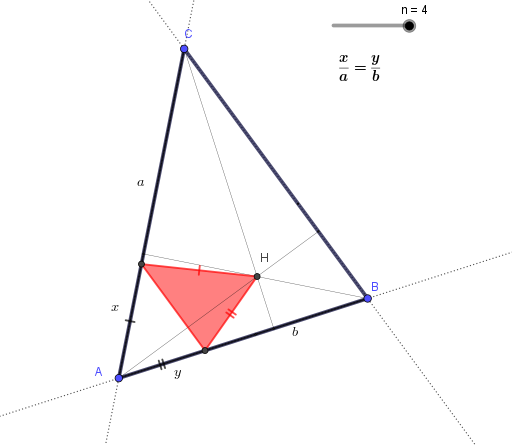
This example demonstrates how to visualize and construct geometric proportion relationships inside a triangle by using the incircle, its center, and angle bisectors. Key math concepts include the incircle (Incircle) and incenter (Center), angle bisectors (LineBisector), intersections of constructed lines/objects (Intersect), as well as auxiliary constructions such as midpoints (Midpoint) and perpendicular (orthogonal) lines (OrthogonalLine). Construction approach: first build triangle ABC with Polygon; construct the incircle using Incircle and obtain its center with Center. Then draw angle bisectors with LineBisector and compute their intersections with Intersect to locate key points and derived segments (Segment). Use Midpoint and OrthogonalLine to create needed metric helpers and establish the proportional quantities represented by labeled distances/parameters (via Text and the corresponding points/objects). The result is a clear diagram connecting triangle geometry and measurable ratio quantities. Suitable for high school to early undergraduate geometry instruction and for teaching geometric constructions and proportion relationships through circles and angle bisectors.
GeoGebra Commands & Parameters
Polygon(A, B, C) → d1, c, a, bLine(A, B) → fLine(C, B) → gLine(A, C) → hLineBisector(A, B) → iLineBisector(C, B) → jIntersect(i, j) → ULineBisector(A, U) → kIntersect(h, k) → DIntersect(f, k) → EPolygon(D, E, U) → d2, u, d, eSegment(A, E) → lSegment(A, D) → mSegment(D, C) → pSegment(E, B) → qMidpoint(A, B) → FMidpoint(C, A) → GSegment(G, B) → rSegment(F, C) → sIntersect(r, s) → SSegment(U, C) → tSegment(U, B) → f_1Segment(U, A) → g_1Midpoint(C, B) → H_{1}Segment(S, H_{1}) → h_1Segment(S, F) → i_1Segment(G, S) → j_1LineBisector(A, S) → k_1Intersect(h, k_1) → I_{1}Intersect(f, k_1) → JPolygon(I_{1}, J, S) → d3, s_1, i_2, j_2Segment(A, J) → l_1Segment(A, I_{1}) → m_1Segment(I_{1}, C) → n_1Segment(J, B) → p_1Incircle(A, B, C) → c_1Center(c_1) → IIntersect(c_1, h, 1) → LIntersect(c_1, f, 1) → MIntersect(c_1, g, 1) → NSegment(I, N) → q_1Segment(I, L) → r_1Segment(I, M) → t_1LineBisector(A, I) → a_1Intersect(f, a_1) → KIntersect(h, a_1) → OPolygon(O, K, I) → d4, i_3, o, k_2Segment(A, O) → b_1Segment(A, K) → d_1Segment(O, C) → e_1Segment(K, B) → f_2OrthogonalLine(B, h) → g_2OrthogonalLine(C, f) → h_2Intersect(h_2, f) → PIntersect(g_2, h) → QIntersect(g_2, h_2) → HOrthogonalLine(A, g) → l_2Intersect(g, l_2) → TSegment(C, P) → m_2Segment(A, T) → n_2Segment(Q, B) → p_2LineBisector(A, H) → q_2Intersect(q_2, h) → RIntersect(q_2, f) → VPolygon(R, V, H) → d5, h_3, r_2, vSegment(A, V) → s_2Segment(V, B) → t_2Segment(A, R) → a_2Segment(R, C) → b_2
AI Drawing Prompt Reference
Draw a triangle with its incircle and angle bisectors. First, construct triangle ABC, then draw the incircle and mark its center. Next, use the angle bisector tool to create the angle bisectors of the triangle and find their intersection point. Create auxiliary line segments using midpoints and perpendicular lines, and label key distances. Finally, use text tools to annotate important proportional relationships, demonstrating the connection between the incircle, angle bisectors, and the triangle's geometry.
The prompt above was compiled from the original drawing commands and is for reference only.