
From a Complete Quadrilateral to Miquel Point: Circumcircles and Orthocenter Geo
Loading the math board and drawing, please wait…
In collections
Besondere Punkte/Special Points
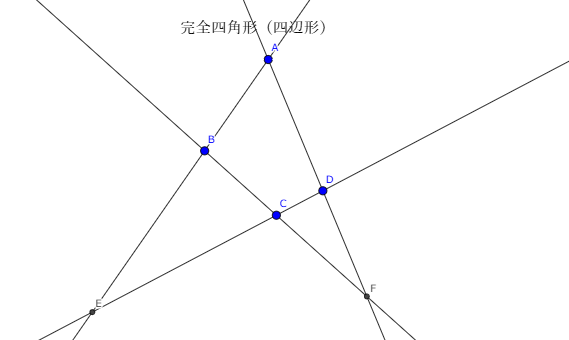
This example demonstrates how to start from a complete quadrilateral configuration and use circumcircle and intersection relationships to locate the Miquel point, highlighting its geometric connections to orthocenter-type structure and symmetry. Key concepts include the Miquel point of a complete quadrilateral (characterized through circumcircles of the constituent triangles), circumcircle geometry, symmetry-driven simplifications, and the way geometric constraints can be represented via circles and related curve/function objects. Construction workflow in GeoGebra: Line and Intersect determine the essential lines and their intersection points; Circle constructs the required circumcircles; TriangleCenter extracts relevant triangle centers (to reflect orthocenter/center structures); Parabola is used to incorporate curve/constraint visualization alongside the geometric setup. The scene combines constructed points (e.g., A, B, C, D and derived points), circumcircles, intersection points, center points, and labels to complete an interactive path from the complete quadrilateral to the target Miquel point. Suitable for advanced secondary-school geometry, contest preparation, and GeoGebra-based exploratory lessons linking pure geometry with curve/function visualization.
GeoGebra Commands & Parameters
Line(A, B) → aLine(B, C) → bLine(C, D) → cLine(D, A) → dIntersect(a, c) → EIntersect(b, d) → FLine(B, D) → fLine(A, C) → gLine(E, F) → hCircle(B, E, C) → eCircle(D, C, F) → kCircle(E, A, D) → pCircle(A, B, F) → qIntersect(q, k) → G, H, ,TriangleCenter(A, B, F, 3) → ITriangleCenter(A, D, E, 3) → JTriangleCenter(D, C, F, 3) → KTriangleCenter(B, C, E, 3) → LCircle(J, L, H) → rTriangleCenter(A, B, F, 4) → MTriangleCenter(C, D, F, 4) → NTriangleCenter(A, E, D, 4) → OTriangleCenter(E, B, C, 4) → PLine(M, O) → iParabola(H, i) → s
AI Drawing Prompt Reference
Draw a geometric configuration of a complete quadrilateral, showing how to locate the Miquel point by constructing circumcircles of the constituent triangles and using their intersections. Begin by drawing the four sides and finding the intersection points of every two sides. Then, construct circumcircles using these points and the vertices of the triangles. Identify relevant center points, resembling orthocenters or symmetry centers, from the circumcircle intersections. Finally, incorporate a parabola to visualize the geometric setup and constraints, completing the path from the complete quadrilateral to the Miquel point.
The prompt above was compiled from the original drawing commands and is for reference only.