
Relief Surface Construction with Splines
Loading the math board and drawing, please wait…
In collections
intersection: surface-surface, curve-curve
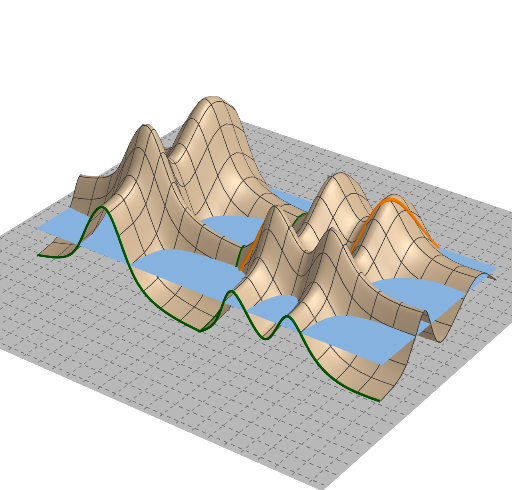
This example demonstrates how to create a “relief” or terrain-like 3D surface using spline curves under geometric constraints. It focuses on key ideas such as parametric spline interpolation, constructing surfaces from curve sections, and using geometric operations (intersection, orthogonal constructions, and tangent-related elements) to control the shape. Construction workflow: Intersect is used to locate critical points and section intersections (points like A, B, C, …); Spline generates the guiding curves (sp1, sp2 and their primed variants); OrthogonalLine provides perpendicular helper lines (l1, l2); Point together with CurveCartesian defines the curve geometry, while Polygon supplies boundary constraints. Plane establishes the reference plane, and Function and Surface turn the curve/section data into the final 3D surface (objects such as f and g). Additional elements like PointIn and the various auxiliary objects (e.g., q1, a_1, h, q, r, n, p, o, Q, U, V, etc.) support consistent placement of sections and local smoothness. Suitable for advanced high-school math, math visualization projects, and introductory instruction on curves and surfaces.
GeoGebra Commands & Parameters
Intersect(xAxis, yAxis) → ASpline(l1, 3) → sp1OrthogonalLine(G, xAxis) → fPoint(f) → MSpline(l2, 3) → sp2CurveCartesian(x(sp1(t)), 0, y(sp1(t)), t, 0, 1) → sp1'CurveCartesian(0, x(sp2(t)), y(sp2(t)), t, 0, 1) → sp2'Polygon(A, N, P, O) → q1, a_1, n, p, oPointIn(q1) → QPoint(q1) → UPoint(q1) → VCurveCartesian(U + (k * (V - U)), k, 0, 1) → hPlane(xAxis, zAxis) → qPlane(yAxis, zAxis) → rPoint(f) → B_1Spline(l3, 3) → sp3CurveCartesian((-x(sp3(t))), 0, y(sp3(t)), t, 0, 1) → sp3'Function(ff, (-x(G)), x(G), 0, x(G)) → cSurface(sp1'(s) + sp2'(t), s, 0, 1, t, 0, 1) → s1Surface(sp3'(s) + sp2'(t), s, 0, 1, t, 0, 1) → s2CurveCartesian(s1(x(U) + (t * (x(V) - x(U))), y(U) + (t * (y(V) - y(U)))), t, 0, 1) → i
AI Drawing Prompt Reference
Draw a 3D surface resembling a terrain. The surface is generated from two parametric cubic splines defined on the x-axis and y-axis. Intersection points of the curves serve as key points for boundary constraints. Vertical auxiliary lines are constructed to define the geometry of the curves. Finally, combine the curves into a surface to create a smooth, undulating 3D shape. Ensure the surface has proper boundary constraints and smooth transitions.
The prompt above was compiled from the original drawing commands and is for reference only.