
Cutting a Paraboloid with Polyline Tool in GeoGebra
Loading the math board and drawing, please wait…
In collections
intersection: surface-surface, curve-curve
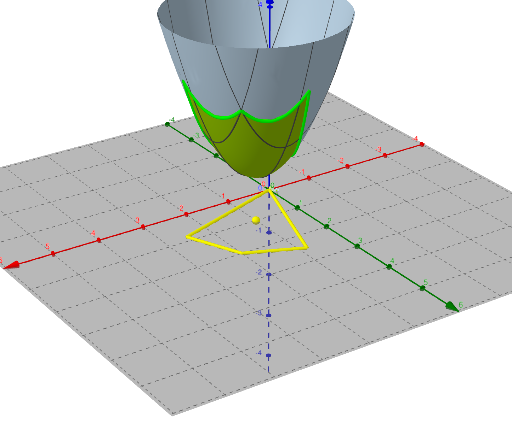
This example demonstrates how to use GeoGebra's Polyline (CorbaPoligonal) tool to cut through a paraboloid and create cross-section curves in three-dimensional space. Key mathematical concepts include: (1) the paraboloid - a quadric surface formed by rotating a parabola around its axis; (2) parametric equations (CurveCartesian) for defining space curves; (3) cross-section analysis in solid geometry. Construction points: Use the Vertex command to locate key vertices, apply the PolyLine/CorbaPoligonal tool to draw polylines forming the cross-section boundary, and utilize CurveCartesian commands to construct parametric curves. Suitable for high school and university students studying solid geometry, parametric curves, and spatial analytic geometry, as well as math teachers demonstrating cross-section problems.
GeoGebra Commands & Parameters
Vertex(in) → A, B, C, DPolyLine(A, B, D, C, A) → fCorbaPoligonal(f, 4) → eCurveCartesian(x(e(t)), y(e(t)), a(x(e(t)), y(e(t))), t, 0, 4) → b
AI Drawing Prompt Reference
Draw a three-dimensional paraboloid surface. Identify four key vertices on the surfacehol and connect them sequentially with a closed polyline lying on the surface. Subdivide this polyline into four segments to form a spatial polyline. Then project this polyline onto the paraboloid using its equation to generate a precise three-dimensional cross-section curve that lies exactly on the surface. The final figure shows a paraboloid cut by a polyline, illustrating a cross-section in solid geometry.
The prompt above was compiled from the original drawing commands and is for reference only.