
From unit-circle sums to a 3D sphere: Riemann-sum style geometry
Loading the math board and drawing, please wait…
In collections
Pi Approximations
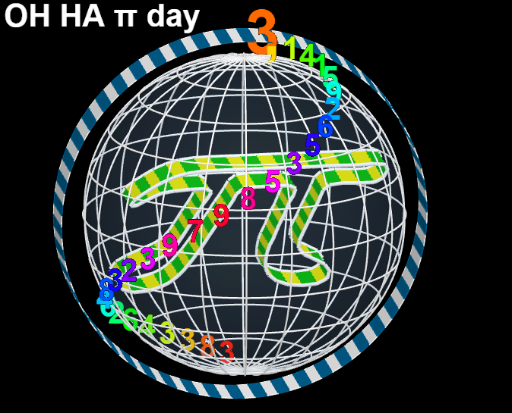
This example visualizes how partitioned sums on the unit circle (and related arc/curve segments) can approximate cumulative geometric quantities. By displaying upper/lower Riemann-sum behavior and an arithmetic-mean style combination of terms, it highlights the convergence intuition behind sum-based approximation and integral-like results. The key concepts include the unit circle and circle geometry, Riemann sums (upper and lower sums), arithmetic mean as an approximation aggregator, and symmetry/geometry transforms that turn 2D sum structures into clearer spatial arrangements. Construction-wise, it uses Sequence to generate parameters/partition lists, CurveCartesian to build Cartesian-defined curve/segment geometry, Midpoint to place representative points for each subinterval, and Mirror to enforce symmetric structure. Sphere generates a 3D object to connect the 2D summation idea with a solid visualization. Lists (e.g., liste1~liste11 and related subsets) organize terms such as R_{1} and R, together with labeled parameters like β to show how the sum components relate to the displayed diagram. Suitable for middle-to-high school advanced classes and early calculus learning, as well as teaching and interactive presentations on “partition-and-sum” approximation.
GeoGebra Commands & Parameters
Sequence(O + (0, (ff * f(i)), ((0.5 * ff) * g(i))), i, 0, 6.28319, (2 * pi / n)) → liste1Sequence(Segment[Element[liste1, i], Element[liste1, i + 1]], i, 1, Length[liste1]) → liste2Sequence(O + (Thickness, (ff * f(i)), ((0.5 * ff) * g(i))), i, 0, 6.28319, (2 * pi / n)) → liste3Sequence(Segment[Element[liste3, i], Element[liste3, i + 1]], i, 1, Length[liste3]) → liste4Sequence(Segment[Element[liste1, i], Element[liste3, i]], i, 1, Length[liste1]) → liste5Sequence(O + (0, (R_{1} * cos(i)), (R_{1} * sin(i))), i, 0, 6.28319, (2 * pi / n)) → liste6Sequence(O + (Thickness, (R_{1} * cos(i)), (R_{1} * sin(i))), i, 0, 6.28319, (2 * pi / n)) → liste7Sequence(Polygon[Element[liste6, i], Element[liste6, i + 1], Element[liste7, i + 1], Element[liste7, i]], i, 1, Length[liste6]) → liste8Sequence(Polygon[Element[liste1, i], Element[liste1, i + 1], Element[liste3, i + 1], Element[liste3, i]], i, 1, Length[liste3]) → liste9Sequence(Polygon[Element[liste1, i], Element[liste1, i + 1], Element[liste3, i + 1], Element[liste3, i]], i, 1, Length[liste3], 2) → liste10Sequence(Polygon[Element[liste6, i], Element[liste6, i + 1], Element[liste7, i + 1], Element[liste7, i]], i, 1, Length[liste6], 2) → liste11CurveCartesian(x(O) + (ff * f(i)), y(O) + ((0.5 * ff) * g(i)), i, 0, 6.28319) → aMidpoint(Element[liste7, 1], Element[liste7, n / 2]) → AMirror(liste7, A) → liste7'Sequence((x(A), y(A) + ((2 * k) * cos(k)), z(A) + ((2 * k) * sin(k)) + 1), k, 0, (2 * pi), (2 * pi / 50)) → l3Sequence((x(A) + ((R + 1.5) * (1 + (sin(i) * sin(((2 * pas) * i))))) - (R + 1.5), y(A) + ((((R + 1.5) * (1 + (sin(i) * cos(((2 * pas) * i))))) - (R + 1.5)) * cos(β)), z(A) + (((((R + 1.5) * (1 + cos(i))) - (R + 1.5)) * sin(β)) * 5.6)), i, 0, c, c / 30) → l4Sphere(A, R) → bSequence(Text[Element[l1, i], Element[l4, i]], i, 1, Length[l4]) → l2Sequence(CurveCartesian[x(A) + ((R * cos(k)) * sin(u)), y(A) + ((R * cos(k)) * cos(u)), z(A) + (R * sin(k)), k, 0, (2 * pi)], u, 0, (2 * pi), (2 * pi / 11)) → l5Sequence(CurveCartesian[x(A) + ((R * cos(k)) * sin(u)), y(A) + ((R * cos(k)) * cos(u)), z(A) + (R * sin(k)), u, 0, (2 * pi)], k, 0, (2 * pi), (2 * pi / 11)) → l6CurveCartesian(x(A) + ((R + 1.5) * (1 + (sin(i) * sin(((2 * pas) * i))))) - (R + 1.5), y(A) + ((((R + 1.5) * (1 + (sin(i) * cos(((2 * pas) * i))))) - (R + 1.5)) * cos(β)), z(A) + (((((R + 1.5) * (1 + cos(i))) - (R + 1.5)) * sin(β)) * 5.6), i, 0, c) → dCurveCartesian(x(A) + ((R + 0.5) * (1 + (sin(i) * sin(((2 * pas) * i))))) - (R + 0.5), y(A) + ((((R + 0.5) * (1 + (sin(i) * cos(((2 * pas) * i))))) - (R + 0.5)) * cos(β)), z(A) + (((((R + 0.5) * (1 + cos(i))) - (R + 0.5)) * sin(β)) * 5.6), i, 0, c) → eElement(l2, A1) → B1Element(l2, A2) → B2Element(l2, A3) → B3Element(l2, A4) → B4Element(l2, A5) → B5Element(l2, A6) → B6Element(l2, A7) → B7Element(l2, A8) → B8Element(l2, A9) → B9Element(l2, A10) → B10Element(l2, A11) → B11Element(l2, A12) → B12Element(l2, A13) → B13Element(l2, A14) → B14Element(l2, A15) → B15Element(l2, A16) → B16Element(l2, A17) → B17Element(l2, A18) → B18Element(l2, A19) → B19Element(l2, A20) → B20Element(l2, A21) → B21Element(l2, A22) → B22Element(l2, A23) → B23Element(l2, A24) → B24Element(l2, A25) → B25Element(l2, A26) → B26Element(l2, A27) → B27Element(l2, A28) → B28Element(l2, A29) → B29Element(l2, A30) → B30
AI Drawing Prompt Reference
Draw a Riemann-sum approximation of the unit circle, showing upper and lower Riemann sums and their arithmetic mean combination. The 2D figure includes curve segments and points arranged symmetrically to represent the summation structure. Then generate a 3D sphere to connect the 2D summation idea with a solid object. The construction order is to first build the 2D summation figure, then create the 3D sphere.
The prompt above was compiled from the original drawing commands and is for reference only.