
Addition Puzzle with Circle Arcs and Mirror Constructions
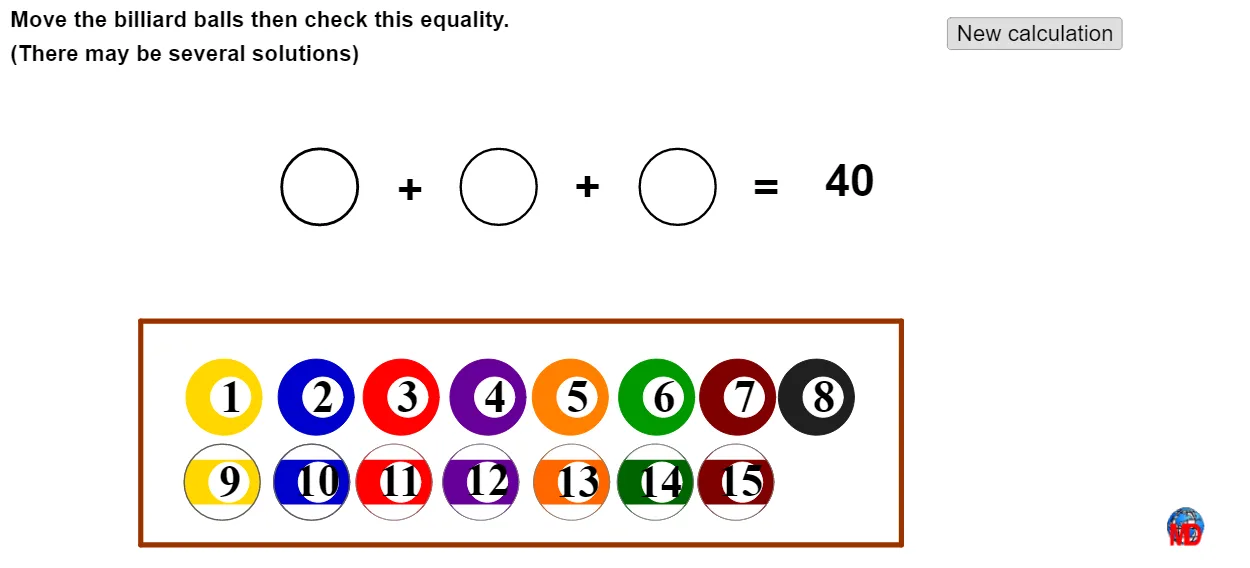
Loading the math board and drawing, please wait…
This example demonstrates an “addition puzzle” where circle and arc constructions, together with mirror transformations and random choices, produce geometrically linked numerical outcomes. It highlights core ideas from elementary number operations (addition over natural numbers), an elementary view of polynomial-function relationships (used to express or visualize the underlying dependency), and probability & statistics notions such as discrete geometric distribution behavior and standard deviation to quantify variability across random configurations. In GeoGebra, the construction is driven by commands like Circle (building circles), CircumcircleArc (creating circumcircle arcs tied to key points/polygons), Mirror (reflecting configurations to form consistent puzzle patterns), Random (generating cases), and If (conditional logic for which elements/values appear). Polygon is used to form the main geometric “puzzle frame,” while labeled points and text objects (e.g., A, B, C, D and their indexed variants, plus texte labels) organize the correspondence between the drawn geometry and the resulting numeric/addition statements. Suitable for middle-school to early high-school learners, as well as for classroom exploration combining geometry construction with introductory probability and statistics.
GeoGebra Commands & Parameters
Circle(A, 0.85) → cCircle(A + (0.15, 0), 0.45) → dCircle(A_1, 0.85) → c_1Circle(A_1 + (0.15, 0), 0.45) → d_1Circle(A_2, 0.85) → c_2Circle(A_2 + (0.15, 0), 0.45) → d_2Circle(A_3, 0.85) → c_3Circle(A_3 + (0.15, 0), 0.45) → d_3Circle(A_4, 0.85) → c_4Circle(A_4 + (0.15, 0), 0.45) → d_4Circle(A_5, 0.85) → c_5Circle(A_5 + (0.15, 0), 0.45) → d_5Circle(A_6, 0.85) → c_6Circle(A_6 + (0.15, 0), 0.45) → d_6Circle(A_7, 0.85) → c_7Circle(A_7 + (0.15, 0), 0.45) → d_7Circle(A_9, 0.85) → c_9Circle(A_9 + (0.15, 0), 0.45) → d_9CircumcircleArc(B, D, C) → eMirror(B, A_9) → B'Mirror(D, A_9) → D'Mirror(C, A_9) → C'CircumcircleArc(B', D', C') → e'Circle(A_9, 0.85) → fCircle(A_8, 0.85) → c_8Circle(A_8 + (0.15, 0), 0.45) → d_8CircumcircleArc(B_1, D_1, C_1) → e_1Mirror(B_1, A_8) → B'_1Mirror(D_1, A_8) → D'_1Mirror(C_1, A_8) → C'_1CircumcircleArc(B'_1, D'_1, C'_1) → e'_1Circle(A_8, 0.85) → f_1Circle(A20, 0.85) → c_{10}Circle(A20 + (0.15, 0), 0.45) → d_{10}CircumcircleArc(B_2, D_2, C_2) → e_2Mirror(B_2, A20) → B'_2Mirror(D_2, A20) → D'_2Mirror(C_2, A20) → C'_2CircumcircleArc(B'_2, D'_2, C'_2) → e'_2Circle(A20, 0.85) → f_2Circle(A_{11}, 0.85) → c_{11}Circle(A_{11} + (0.15, 0), 0.45) → d_{11}CircumcircleArc(B_3, D_3, C_3) → e_3Mirror(B_3, A_{11}) → B'_3Mirror(D_3, A_{11}) → D'_3Mirror(C_3, A_{11}) → C'_3CircumcircleArc(B'_3, D'_3, C'_3) → e'_3Circle(A_{11}, 0.85) → f_3Circle(A_{12}, 0.85) → c_{12}Circle(A_{12} + (0.15, 0), 0.45) → d_{12}CircumcircleArc(B_4, D_4, C_4) → e_4Mirror(B_4, A_{12}) → B'_4Mirror(D_4, A_{12}) → D'_4Mirror(C_4, A_{12}) → C'_4CircumcircleArc(B'_4, D'_4, C'_4) → e'_4Circle(A_{12}, 0.85) → f_4Circle(A_{13}, 0.85) → c_{13}Circle(A_{13} + (0.15, 0), 0.45) → d_{13}CircumcircleArc(B_5, D_5, C_5) → e_5Mirror(B_5, A_{13}) → B'_5Mirror(D_5, A_{13}) → D'_5Mirror(C_5, A_{13}) → C'_5CircumcircleArc(B'_5, D'_5, C'_5) → e'_5Circle(A_{13}, 0.85) → f_5Circle(A_{14}, 0.85) → c_{14}Circle(A_{14} + (0.15, 0), 0.45) → d_{14}CircumcircleArc(B_6, D_6, C_6) → e_6Mirror(B_6, A_{14}) → B'_6Mirror(D_6, A_{14}) → D'_6Mirror(C_6, A_{14}) → C'_6CircumcircleArc(B'_6, D'_6, C'_6) → e'_6Circle(A_{14}, 0.85) → f_6Circle(E, 0.85) → gCircle(F, 0.85) → hCircle(G, 0.85) → kRandom(6, 42) → totalIf(Distance[A, E] < 0.15 ∨ Distance[A, F] < 0.15 ∨ Distance[A, G] < 0.15, 1, 0) → aaIf(Distance[A_1, E] < 0.15 ∨ Distance[A_1, F] < 0.15 ∨ Distance[A_1, G] < 0.15, 2, 0) → bbIf(Distance[A_3, E] < 0.15 ∨ Distance[A_3, F] < 0.15 ∨ Distance[A_3, G] < 0.15, 3, 0) → ccIf(Distance[A_4, E] < 0.15 ∨ Distance[A_4, F] < 0.15 ∨ Distance[A_4, G] < 0.15, 4, 0) → ddIf(Distance[A_2, E] < 0.15 ∨ Distance[A_2, F] < 0.15 ∨ Distance[A_2, G] < 0.15, 5, 0) → eeIf(Distance[A_5, E] < 0.15 ∨ Distance[A_5, F] < 0.15 ∨ Distance[A_5, G] < 0.15, 6, 0) → ffIf(Distance[A_6, E] < 0.15 ∨ Distance[A_6, F] < 0.15 ∨ Distance[A_6, G] < 0.15, 7, 0) → ggIf(Distance[A_7, E] < 0.15 ∨ Distance[A_7, F] < 0.15 ∨ Distance[A_7, G] < 0.15, 8, 0) → hhIf(Distance[A_9, E] < 0.15 ∨ Distance[A_9, F] < 0.15 ∨ Distance[A_9, G] < 0.15, 9, 0) → iiIf(Distance[A_8, E] < 0.15 ∨ Distance[A_8, F] < 0.15 ∨ Distance[A_8, G] < 0.15, 10, 0) → jjIf(Distance[A20, E] < 0.15 ∨ Distance[A20, F] < 0.15 ∨ Distance[A20, G] < 0.15, 11, 0) → kkIf(Distance[A_{11}, E] < 0.15 ∨ Distance[A_{11}, F] < 0.15 ∨ Distance[A_{11}, G] < 0.15, 12, 0) → llIf(Distance[A_{12}, E] < 0.15 ∨ Distance[A_{12}, F] < 0.15 ∨ Distance[A_{12}, G] < 0.15, 13, 0) → mmIf(Distance[A_{13}, E] < 0.15 ∨ Distance[A_{13}, F] < 0.15 ∨ Distance[A_{13}, G] < 0.15, 14, 0) → nnIf(Distance[A_{14}, E] < 0.15 ∨ Distance[A_{14}, F] < 0.15 ∨ Distance[A_{14}, G] < 0.15, 15, 0) → ooPolygon(P, Q, R, S) → poly1, p, q, r, s
AI Drawing Prompt Reference
On a 2D plane, start with a main point used as a reference center. Around this reference, construct paired circle arcs by drawing a larger circle with radius 0.85, and also a smaller circle of radius 0.45 whose center is shifted 0.15 units to the right; repeat the same circle setup for several sequentially defined centers to create multiple arc-cases. Then choose three key points that form the main geometric triplet for each case and draw the circumcircle arc determined by these three points. Reflect each of the three points across the same reference point to obtain the mirrored triplet, and draw the corresponding circumcircle arc through the mirrored points. Arrange the original and mirrored circumcircle arcs together to form the visual “addition puzzle” geometry frame.
The prompt above was compiled from the original drawing commands and is for reference only.