
3D Dome with Cantilever: GeoGebra Solid Modeling
Loading the math board and drawing, please wait…
In collections
muqarnas - English version
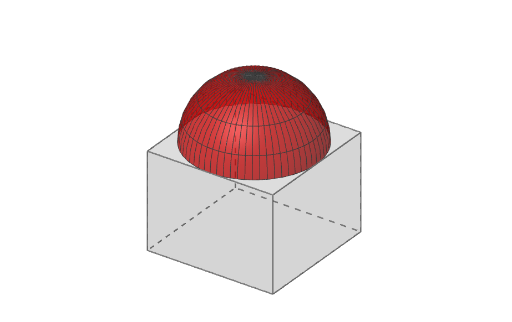
This example demonstrates how to build a 3D “dome with cantilever” structure in GeoGebra, visualizing the spatial extension and assembled geometry of a curved shell combined with a projecting cantilever element. Key mathematical ideas include solid-geometry construction, generating curved surfaces from circles and intersections, using transformations for symmetry and placement, and organizing geometric parameters to analyze shape characteristics (optionally connecting to centroid and calculus concepts like derivatives/integrals in related investigations). Construction workflow: define critical points and cross-sections with Segment and Point, form polygonal outlines using Polygon, generate surfaces and volumes with Surface, Prism, and Cylinder, create circular geometry via Circle, and compute junctions using Intersect. Use Rotate to create rotational structure and Mirror to enforce symmetry. Line objects support alignment and direction. The model is organized around dome faces and side faces (e.g., zijvlak*) as well as beam/rib elements (Ribbe*). Suitable for high school through early undergraduate use in 3D geometric construction, STEM modeling, and engineering-inspired visualization.
GeoGebra Commands & Parameters
Segment(A, AA) → fPoint(f) → ISegment(A, I) → gPolygon(A, B, C, D) → veelhoek1, a_1, b_1, c, dPrism(veelhoek1, -1.5) → e, E, Ribbe1, Ribbe2, Ribbe3, Ribbe4, Ribbe5, Ribbe6, Ribbe7, Ribbe8, F, G, H, zijvlak1, zijvlak2, zijvlak3, zijvlak4, zijvlak5Surface(cos(α), sin(α), sin(α), α, 0°, 180°, α, 0°, 180°) → bSurface(cos(α), sin(α), cos(β), α, 0°, 360°, β, 0, 90°) → aSurface((sqrt(1 - h^(2)) * cos(θ)), (sqrt(1 - h^(2)) * sin(θ)), h, θ, 0, 6.28319, h, 0, 1) → hLine(O, OO) → asCircle(O, 1, as) → kCylinder(k, 1.5) → i_3, i_2, i_3Intersect(yAxis, zijvlak4) → JRotate(J, 22.5°, as) → J'Line(O, J') → mIntersect(m, zijvlak5) → KSegment(A, D) → nIntersect(m, n) → LMirror(L, J) → L'Polygon(L, L', 8, xOyPlane) → veelhoek2, p, N, P, Q, R, S, q, r, s, t, f_1, g_1, h_1, MSegment(C, D) → i_1Rotate(L, -90°, i_1) → L'_1Polygon(L'_1, L, S) → veelhoek3, s_1, l'_1, l_1Rotate(veelhoek3, 90°, as) → veelhoek3'Rotate(veelhoek3, -90°, as) → veelhoek3'_1Rotate(veelhoek3, 180°, as) → veelhoek3'_2Rotate(L'_1, 90°, as) → TRotate(L'_1, -90°, as) → URotate(L'_1, 180°, as) → VPolygon(H, E, U, L', L, L'_1) → veelhoek4, h_2, e_1, u, l', l_2, l'_2Polygon(E, F, V, N, M, U) → veelhoek5, e_2, f_2, v, n_1, m_1, u_1Polygon(F, G, T, Q, P, V) → veelhoek6, f_3, g_2, t_1, q_1, p_1, v_1Polygon(G, H, L'_1, S, R, T) → veelhoek7, g_3, h_3, o_2, s_2, r_1, t_2
AI Drawing Prompt Reference
Draw a 3D dome structure with a half-spherical dome and a cantilever beam. Start by defining key points and cross-sections, then use polygons and prisms to generate the dome's surface and volume. Next, create the cantilever beam using rotation and translation. Finally, complete the beam details with intersection and mirroring operations to ensure symmetry.
The prompt above was compiled from the original drawing commands and is for reference only.