
Arco Carpanel: Geometric Construction and Transformations
Loading the math board and drawing, please wait…
In collections
geometriadinamica.es
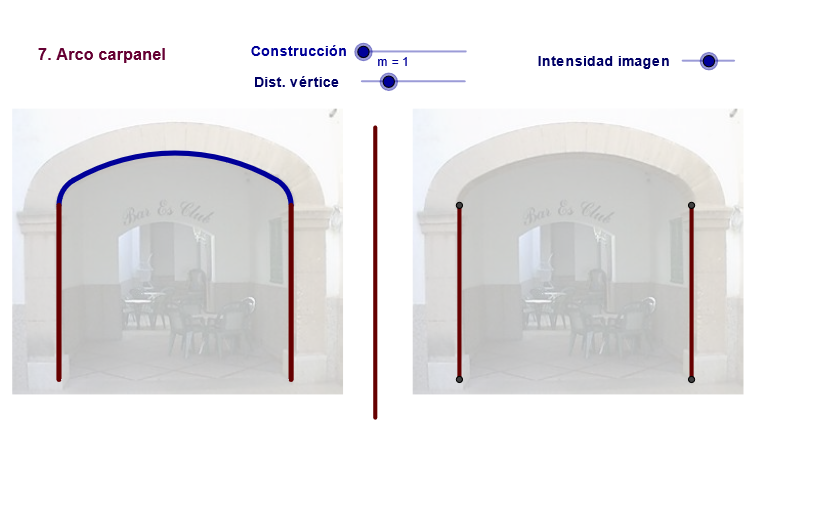
This GeoGebra example demonstrates the construction of an 'Arco Carpanel' (carpanel arch) using a series of geometric commands, and then applies transformations such as mirroring, rotation, and translation to create symmetric planar or solid combinations. The core mathematical concepts involve circular arcs (CircleArc), polygons (Polygon), midpoints (Midpoint), segments (Segment), lines (Line), circles (Circle), as well as functions and vectors. The construction summary reveals the use of GeoGebra commands including Segment, Midpoint, Line, Min, If, Circle, Intersect, Mirror, Ray, Rotate, CircleArc, Arc, Polygon, Vector, and Translate, with objects such as points (A, B, C, D, etc.), segments (a, b, e), circles (c, c1), arcs (i, j), and text labels (text6, text9). This example is suitable for middle or high school geometry or mathematical modeling classes, helping students understand circular arcs, symmetry transformations, and basic geometric construction techniques. It can also serve as a reference for arch structures in architecture or design.
GeoGebra Commands & Parameters
Segment(D, B) → eMidpoint(C, D) → D_1Segment(C, D_1) → l_2Midpoint(C, D) → FLine(F, e) → kMin(1.5707963267948966, ((j - 5) * 3.14 / 6)) → aaaSegment(A, C) → dIf(zz < 0, 10, zz) → nSegment(C, F) → rCircle(C, m) → sIntersect(s, r, 1) → HMirror(H, k) → H'Mirror(H, k) → H'_1Mirror(D, k) → D'_1Midpoint(C, D) → KCircle(K, C) → f_1Intersect(f_1, k, 1) → LSegment(K, C) → h_1Circle(H, H'_1) → c_1Circle(H'_1, H) → d_1Intersect(c_1, d_1, 2) → RRay(R, H) → a_1Ray(R, H'_1) → b_1Segment(H, C) → e_1Rotate(C, Max[300.00000000000006°, ((-(n - 2)) * 180 / 2 / (3.14°))], H) → C'_3Circle(C, H) → c_2Intersect(c_2, a_1, 2) → SRotate(H, Max[300.00000000000006°, ((-(n - 4)) * 180 / 4 / (3.141592653589793°))], H) → H'_2Segment(C'_3, H) → a_2Segment(S, R) → n_1CircleArc(H, C'_3, C) → d_2Rotate(R, Max[300, ((-(n - 4)) * 180 / 4 / (3.141592653589793°))], R) → R'Rotate(S, Max[300.00000000000006°, ((-(n - 4)) * 180 / 4 / (3.141592653589793°))], R) → S'Segment(S', R) → b_2CircleArc(R, S', S) → e_2Mirror(H, k) → H'_3Mirror(C'_3, k) → TMirror(C, k) → C'_4Arc(Mirror[Circle[H, C'_3], k], T, C'_4) → f_2Mirror(C'_3, k) → EMirror(H, k) → H'_4Segment(E, H'_4) → fPolygon(H, H'_1, R) → poly1, r_2, h, h'_1Polygon(C, S, H) → poly2, h_2, c_3, s_2Circle(H'_1, D) → gCircle(D, H'_1) → qIntersect(g, q, 1) → GPolygon(H'_1, D, G) → poly3, g_2, h'_2, d_3Midpoint(C, C'_4) → URotate(C, Max[300.00000000000006°, ((-(c - 2)) * 180 / 3 / (3.14°))], F) → C'Segment(C', F) → lCircleArc(F, C', C) → f_3Mirror(F, k) → F'Mirror(C', k) → C''Mirror(C, k) → C'_1Arc(Mirror[Circle[F, C'], k], C'', C'_1) → g_3Mirror(C', k) → C''_1Mirror(F, k) → F'_1Segment(C''_1, F'_1) → l'Intersect(d, e) → C_1Mirror(C, k) → C'_6Segment(T1, T2) → m_3Mirror(D, m_3) → D'Mirror(B, m_3) → B'Segment(D', B') → e'Mirror(A, m_3) → A'Mirror(C, m_3) → C'_7Segment(A', C'_7) → d'Vector(A, B') → w_1Translate(pic1, w_1) → pic1'Translate(pic1, w_1) → pic1'_1
AI Drawing Prompt Reference
Construct a symmetric planar design by first establishing a few key points, then drawing base segments and a reference line using a midpoint. Create one or more circles centered at specified points and compute their intersection points to serve as arc endpoints. Mirror the main intersection points and arcs across the reference line to obtain corresponding mirrored endpoints, forming paired geometry. Use rotations around a central point to generate additional rotated endpoints, then draw circular arcs between the arc endpoints. Finally connect the endpoints with segments to form several polygonal regions that share the circular-arc boundaries, resulting in a compound shape with left–right symmetry and repeated arc features.
The prompt above was compiled from the original drawing commands and is for reference only.