
Old Lantern: A 3D Geometric Construction and Visualization
Loading the math board and drawing, please wait…
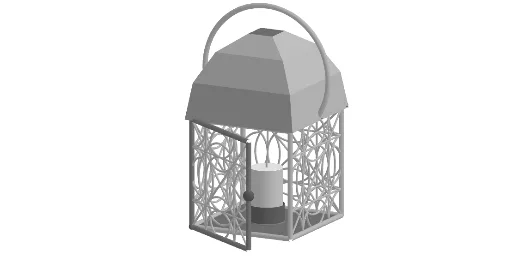
① This GeoGebra example constructs a three-dimensional model named 'Old Lantern', visually demonstrating a lantern-like shape composed of polygons, arcs, circles, and cylinders, integrating both planar and solid geometry interactions. ② Core mathematical concepts include solid geometry (cube, cylinder), polygon and arc construction, midpoint and centroid usage, rotation and transformation (Rotate), along with related topics from the original tags such as probability, quadratic equations, real numbers, calculus, and inequalities, though the primary visual focus is the geometric composition of the 3D object. ③ Construction highlights: Based on the construction summary, the example employs commands such as Polygon, Midpoint, Segment, Intersect, Centroid, CircumcircleArc, Circle, CircleArc, Line, Rotate, Join, Sequence, Cube, Ray, Point, Angle, and Cylinder, with numerous named objects (e.g., m1, A, B, poly1, f, g, h, i, C, D, E, etc.) to assemble the intricate lantern structure. ④ Target audience and use: Suitable for high school and early university mathematics education, serving as a visual aid for solid geometry, geometric construction, and transformations, and useful for exploring 3D modeling and mathematical visualization, or as a creative example combining art and mathematics.
GeoGebra Commands & Parameters
Polygon(A, B, 4) → poly1, f, g, h, i, C, DMidpoint(C, A) → EMidpoint(f) → FMidpoint(A, F) → GMidpoint(F, B) → HMidpoint(h) → IMidpoint(I, C) → JMidpoint(I, D) → KMidpoint(g) → LMidpoint(i) → MMidpoint(C, L) → NMidpoint(L, B) → OMidpoint(A, M) → PMidpoint(M, D) → QSegment(K, G) → jSegment(J, H) → kSegment(Q, N) → lSegment(P, O) → mIntersect(l, j) → RIntersect(m, j) → SIntersect(j, l) → TIntersect(j, poly1) → U, VMidpoint(k) → WMidpoint(l) → ZCentroid(poly1) → A_1Centroid(poly1) → B_1Midpoint(m) → C_1CircumcircleArc(G, C_1, H) → cMidpoint(j) → D_1CircumcircleArc(Q, D_1, P) → dCircumcircleArc(N, W, O) → eCircumcircleArc(K, Z, J) → pCircle(E, W) → qCircleArc(A, G, P) → rIntersect(m, poly1) → E_1, F_1Intersect(m, k) → G_1Intersect(l, k) → H_1Segment(S, H_1) → sIntersect(q, s) → K_1, L_1Midpoint(E, W) → M_1CircumcircleArc(H_1, M_1, G_1) → tMidpoint(D_1, E) → I_1Midpoint(Z, E) → J_1Midpoint(E, C_1) → N_1CircumcircleArc(R, J_1, H_1) → c_1CircumcircleArc(R, I_1, S) → d_1CircumcircleArc(S, N_1, G_1) → e_1Midpoint(W, L) → O_1CircumcircleArc(H_1, O_1, G_1) → f_1Midpoint(M, D_1) → P_1CircumcircleArc(R, P_1, S) → g_1CircleArc(B, O, H) → h_1CircleArc(C, J, N) → k_1CircleArc(D, Q, K) → p_1Midpoint(C_1, F) → Q_1Midpoint(Z, I) → R_1CircumcircleArc(R, R_1, H_1) → q_1CircumcircleArc(S, Q_1, G_1) → r_1Intersect(p, q_1) → S_1, T_1, ,Intersect(d, g_1) → U_1, V_1, ,Intersect(c, r_1) → W_1, Z_1, ,Intersect(e, f_1) → A_2, B_2, ,CircumcircleArc(B_2, L, A_2) → s_1CircumcircleArc(Z_1, F, W_1) → t_1CircumcircleArc(U_1, M, V_1) → c_2CircumcircleArc(T_1, I, S_1) → d_2Segment(A, C) → nSegment(D, B) → aLine(A, B) → bRotate(l1, 90°, b) → l1'Line(E, zAxis) → i_1Rotate(l1', 90°, i_1) → l1''Rotate(l1', (2 * 90°), i_1) → l1''_{1}Rotate(l1', (3 * 90°), i_1) → l1''_{2}Midpoint(D_2, A) → H_2Midpoint(E_2, B) → I_2Polygon(A, B, 4) → poly2, j_1, l_1, m_1, n_1, J_2, K_2Join(Sequence[Sequence[(x(C_2) + ((ray * cos(i + π / 4)) * cos(j)), y(C_2) + ((ray * sin(i + π / 4)) * cos(j)), z(C_2) + (ray * sin(j))), i, 0, 6.28319, (2 * π / n1)], j, 0, 1.5708, π / m1]) → l2Sequence(Polygon[Element[l2, i], Element[l2, i + 1], Element[l2, i + n1 + 2], Element[l2, i + n1 + 1]], i, 1, Length[l2]) → l3Polygon(D_2, E_2, 4, xOyPlane) → poly3, a_1, b_1, f_2, g_2, L_2, M_2Line(D_2, A) → h_2Cube(poly1, true) → o, N_2, arête1, arête4, arête6, arête5, arête2, arête7, arête3, arête8, O_2, P_2, Q_2, face2, face1, face3, face4, face5Circle(H_2, Distance[A, B], i_1) → e_2Ray(R_2, H_2) → i_2Intersect(i_2, e_2) → S_2,CircleArc(H_2, I_2, S_2) → k_2Point(k_2) → T_2Angle(I_2, H_2, T_2) → αRotate(l1', α, h_2) → l1''_{3}Polygon(A, B, O_2, N_2) → q1, j_2, l_2, m_2, n_2Rotate(q1, α, h_2) → q1'Midpoint(arête7) → U_2Midpoint(arête6) → V_2Circle(E, 0.65, i_1) → p_2Cylinder(p_2, 0.65) → u, q_2, vCircle(E, 0.6, i_1) → r_2Cylinder(r_2, 2) → w, w_{2}, w_{3}Segment(E + (0, 0, 2), E + (0, 0, 2.25)) → s_2CircumcircleArc(U_2, W_2, V_2) → t_2
AI Drawing Prompt Reference
Create a 3D geometric “Old Lantern” figure. Start by forming a polygonal main body in space, then construct several midpoints and connecting segments from its edges and vertices. Use intersections of those segments and the polygon boundary to obtain key points that act as anchors for curved features. Draw circles and circumcircles arcs using appropriate anchor points, and compute centroids of the polygon to guide additional arc construction. Apply rotations to transform selected parts so the arcs and polygonal faces wrap into a lantern-like silhouette. Integrate the curved framework with cylinder/solid elements so the final object is assembled from polygons, circular arcs, circles, and cylindrical solids, with layered interactions between planar parts and the 3D volume.
The prompt above was compiled from the original drawing commands and is for reference only.