
Geometric Approximation of π via Circle Area and Polygon Inscription
Loading the math board and drawing, please wait…
In collections
Pi Approximations
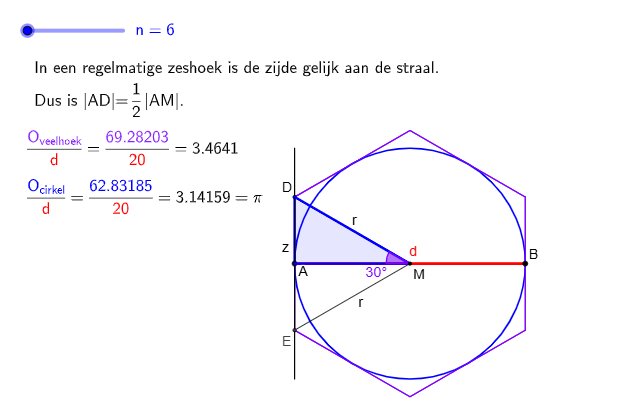
This example demonstrates how the area (and related circumference properties) of a circle can be approximated by constructing inscribed (or circumscribed) polygons with increasing numbers of sides. By observing the polygon’s shape converge to the circle as the side count grows, students gain an intuitive geometric understanding of π-approximation. Key mathematical ideas include circle geometry, regular polygons inscribed in a circle, relationships between angles/chords and polygon sides, and the limiting intuition that discrete shapes can approach continuous ones. Construction-wise, GeoGebra commands such as Circle create the main circle (e.g., objects like C/c), Point, Ray, and Angle determine key vertices and angles (e.g., hoek, C'), Rotate generates repeated vertices by rotational symmetry, Intersect finds required intersection points, and Segment/Polygon build the polygonal approximation (e.g., veelhoek2 with parameters and labeled points). Circumference and auxiliary text/values help present the evolving approximation results (e.g., textual annotations and computed quantities). Suitable for secondary education through introductory university work, especially for lessons on π, geometric construction, and numerical approximation with a visual limit-based perspective.
GeoGebra Commands & Parameters
Circle(M, A) → cMirror(A, M) → BPoint(xAxis) → CRotate(C, (-hoek), M) → C'Ray(M, C') → fIntersect(f, yAxis) → DMirror(D, A) → D'Polygon(D, D', n) → veelhoek2, m, l_1, L, T, U, V, W, Z, A_1, N_1, O_1, P_1, m_1, Q_1, R_1, S_1, T_1, U_1, V_1, W_1, Z_1, A_2, B_3, n_1, C_3, D_3, E_3, F_3, G_3, H_3, I_3, J_3, K_3, L_3, h_2, M_3, N_3, O_3, P_3, Q_3, R_3, S_3, T_3, U_3, V_3, i_2, W_3, Z_3, A_4, B_6, C_6, D_6, E_6, F_6, G_6, H_6, j_2, I_6, J_6, K_6, L_6, M_6, N_6, O_6, P_6, Q_6, R_6, k_2, S_6, T_6, U_6, V_6, W_6, Z_6, A_7, B_7, C_7, D_7, l_2, E_7, F_7, G_7, H_7, I_7, J_7, K_7, L_7, M_7, N_7, m_2, O_7, P_7, Q_7, R_7, S_7, T_7, U_7, V_7, W_7, Z_7, n_2, A_8, p, p_2, q_2, r_2, s_2, t_2, f_4, g_4, h_4, i_4, j_4, q, k_4, l_4, m_4, n_4, p_4, q_4, r_4, s_4, t_4, a_4, r, b_4, c_4, d_4, e_4, f_5, g_5, h_5, i_5, j_5, b_7, t, c_7, d_7, e_7, f_8, g_8, h_8, i_8, j_8, k_8, l_8, a, m_8, n_8, p_8, q_8, r_8, s_8, t_8, a_8, b_8, c_8, i_1, d_8, e_8, f_9, g_9, h_9, i_9, j_9, k_9, l_9, m_9, j_1, n_9, p_9, q_9, r_9, s_9, t_9, a_9, b_9, c_9, d_9, k_1, e_9, f_{10}, g_{10}, h_{10}, i_{10}, j_{10}, k_{10}, I, J, KSegment(A, B) → gPolygon(M, D, D') → driehoek1, d', m_3, dPolygon(M, D, A) → driehoek2, a_1, m_5, d_1Segment(D, M) → hSegment(DD, M) → iCircumference(c) → omciSegment((0, -10), (0, 10)) → jAngle(D, M, A) → α
AI Drawing Prompt Reference
Draw a circle and construct an inscribed regular polygon within it, gradually increasing the number of sides to observe how the polygon approximates the circle. Start by drawing a circle, then take points on the circle and use rotation to generate the polygon's vertices, and finally construct the polygon using these vertices.
The prompt above was compiled from the original drawing commands and is for reference only.