
Constructing the Feynman Triangle: Rotations and Ratio Geometry
Loading the math board and drawing, please wait…
In collections
Besondere Punkte/Special Points
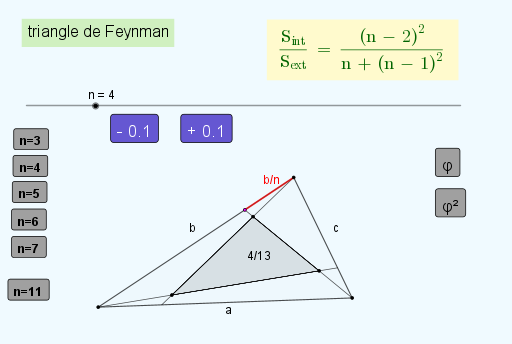
This example demonstrates how to build the so-called “Feynman triangle” configuration and visualize the geometric relationships driven by rotation/transform ideas and resulting ratio structures. Key concepts include triangle geometry, transformation via rotations (conceptually), circle–line intersections, midpoint-based constructions, and assembling polygons to reveal the overall figure. Construction is carried out in GeoGebra using Segment to define base edges, OrthogonalLine for perpendicular lines, Circle to generate auxiliary circles, and Intersect to obtain intersection points. Points and Midpoint are then used to create dependent geometric elements and to form the main Polygon structure for inspection. To express and visualize constraints, the construction also employs ImplicitCurve (e.g., equation objects like eq3 and related curve objects) and Locus to generate the set of points satisfying the evolving conditions (tracking how the configuration changes under parameter/condition variations). It is intended for advanced secondary students, contest geometry learners, and introductory college-level courses focusing on geometric construction, transformation visualization, and constraint-based locus/implicit-curve rendering.
GeoGebra Commands & Parameters
Segment(A_{4}, B_{4}) → aOrthogonalLine(A_{4}, a) → f_{3}Circle(A_{4}, h) → c_2Intersect(c_2, f_{3}, 2) → C_{3}OrthogonalLine(C_{3}, f_{3}) → gPoint(g) → D_{3}Polygon(D_{3}, A_{4}, B_{4}) → t0, b, d, cMidpoint(D_{3}, A_{4}) → Q_{3}Midpoint(A_{4}, B_{4}) → TMidpoint(D_{3}, B_{4}) → WCircle(D_{3}, b / 5) → p_1Circle(D_{3}, c / 5) → q_1Circle(A_{4}, a / 5) → r_1Circle(D_{3}, b / 6) → d_2Circle(A_{4}, b / 6) → e_2Circle(D_{3}, c / 6) → p_2Circle(B_{4}, c / 6) → q_2Circle(A_{4}, a / 6) → r_2Circle(B_{4}, a / 6) → s_2Circle(D_{3}, b / 7) → d_3Intersect(a, b) → J_2Circle(A_{4}, b / 7) → e_3Circle(D_{3}, c / 7) → g_3Circle(B_{4}, c / 7) → p_3Circle(A_{4}, a / 7) → q_3Circle(B_{4}, a / 7) → r_3ImplicitCurve({M, N, O, P_{2}, Q}) → eq3Circle(D_{3}, b / 9) → c_4Circle(A_{4}, b / 9) → d_4Circle(A_{4}, a / 9) → e_4Circle(B_{4}, a / 9) → k_4Circle(B_{4}, c / 9) → c_5Circle(D_{3}, c / 9) → d_5Midpoint(b) → T_3Midpoint(T_3, D_{3}) → U_3Midpoint(T_3, A_{4}) → W_3Midpoint(a) → C_4Midpoint(A_{4}, C_4) → D_4Midpoint(C_4, B_{4}) → F_4Midpoint(c) → H_4Midpoint(H_4, B_{4}) → I_4Midpoint(H_4, D_{3}) → K_4Circle(A_{4}, a / n) → k_1Intersect(k_1, a, 1) → FCircle(B_{4}, c / n) → t_1Intersect(t_1, c, 1) → S_1Circle(D_{3}, b / n) → f_2Intersect(f_2, b, 1) → T_1Segment(A_{4}, S_1) → j_1Segment(D_{3}, F) → m_1Segment(B_{4}, T_1) → n_1Intersect(m_1, n_1) → C_2Intersect(j_1, m_1) → D_2Intersect(j_1, n_1) → E_2Polygon(D_2, C_2, E_2) → t1, a_1, b_1, g_2Locus(P, n) → lLocus(H_2, n) → lieu1Point(lieu1) → R_2Segment(F_2, R_2) → sIntersect(yAxis, xAxis) → T_2Segment(F_2, U_2) → h_1Intersect(p, q, (1, 1)) → BPolygon(D_2, E_2, C_2) → t2, i, j, kSegment(D_{3}, T_1) → mPolygon(D_2, E_2, C_2) → t3, r, t, fPolygon(D_2, E_2, C_2) → t4, f_1, g_1, i_1Polygon(D_2, E_2, C_2) → t5, l_1, s_1, c_1Polygon(C_2, D_2, E_2) → t6, d_1, e_1, h_2Polygon(E_2, D_2, C_2) → t7, e, i_2, j_2
AI Drawing Prompt Reference
Draw the Feynman triangle by first creating a base triangle, then constructing auxiliary lines and circles through rotations and geometric transformations, finding their intersections. Use these points to form new geometric shapes. Calculate midpoints of key segments and draw small circles around them. Finally, employ implicit curves and loci to visualize geometric constraints and dynamic relationships.
The prompt above was compiled from the original drawing commands and is for reference only.