
Cone–Cylinder Intersection and Locus Construction
Loading the math board and drawing, please wait…
In collections
intersection: surface-surface, curve-curve
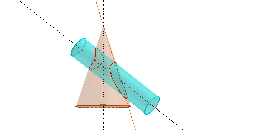
This example demonstrates how geometric relationships between a cone and a cylinder can be obtained via intersection/section lines, producing a corresponding set of points (locus) that changes with the construction. It highlights core ideas from solid geometry—modeling Cone and Cylinder, defining slicing constraints, and extracting key intersection geometry—along with angle relationships (Angles, similar triangles) and trigonometric reasoning (Sinus) that can be connected to equations. Construction-wise, GeoGebra commands such as Point, Circle, Intersect, Segment build foundational objects and intersection points; Cone and Cylinder create the 3D solids; Line and OrthogonalPlane establish the spatial cutting/constraint setup; PointIn filters points with respect to constructed geometric conditions; and Locus generates the point sets (e.g., multiple locus objects) to visualize how the solution set evolves. Suitable for upper secondary and early university students learning 3D geometry, geometric construction, and linking constructions to equation/functional descriptions.
GeoGebra Commands & Parameters
Point(xAxis) → ACircle(zAxis, A) → cPoint(zAxis) → CIntersect(zAxis, xAxis) → BSegment(B, A) → fPoint(zAxis) → DCone(B, D, f) → a, d, bPoint(xAxis) → EPoint(zAxis) → FLine(E, F) → gOrthogonalPlane(E, g) → pPointIn(p) → GCircle(g, G) → ePoint(g) → HSegment(E, G) → hCylinder(E, H, h) → i, k, q, jPoint(c) → ILine(D, I) → lIntersect(l, j) → J, KLocus(K, I) → lieu1Locus(J, I) → lieu2Locus(J, I) → lieu3Locus(K, I) → lieu4Line(B, D) → m
AI Drawing Prompt Reference
Draw the intersection of a cone and a cylinder, showing the locus of points created by their section lines. First, construct a cone and a cylinder with defined bases and heights. Then, draw a line and an orthogonal plane to slice through the cone and cylinder. Identify the intersection points and plot their loci. Finally, display the intersection and the loci, highlighting angle relationships and trigonometric reasoning.
The prompt above was compiled from the original drawing commands and is for reference only.