
Corresponding Angles Thin Slice: Geometry Construction Task 1
Loading the math board and drawing, please wait…
In collections
Parallel Lines and Related Angles: Guided Exploration
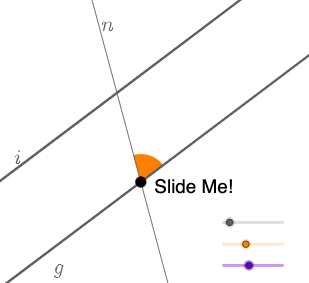
This GeoGebra example demonstrates how corresponding angles are preserved when two lines are cut by a transversal, using a “thin slice” setup to help learners visually track angle relationships and consistency (including in a 3D/solid-geometry context). The key math concepts are corresponding angles, parallel lines with a transversal, angle measurement, and the way geometric transformations (rotation/translation) and direction vectors support maintaining angle correspondences. Construction workflow: Point/Line/Segment/Ray are used to build the geometric skeleton; Rotate creates corresponding orientations; the Angle tool measures and displays angles (e.g., α, β, γ, δ); Circle, CircleArc, and CircleSector together with Intersect generate auxiliary arcs/sectors and intersection points for clear angle marking; Vector encodes spatial direction cues; Translate shifts elements to keep relative placement consistent. The use of labeled objects with “prime” variants highlights paired angle positions. Suitable for middle-school geometry (parallel lines and transversals) and also helpful for lessons on geometric construction and transformations.
GeoGebra Commands & Parameters
Point(y = 0) → ALine(A, B) → fRotate(B, α, A) → B'Angle(B, A, B') → γLine(A, B') → gRotate(B', β, A) → B''Angle(B', A, B'') → δLine(A, B'') → hCircle(A, a) → cIntersect(c, h, 2) → CLine(C, g) → iCircle(C, A) → dCircle(A, C) → eIntersect(e, h, 2) → JSegment(A, C) → jCircle(A, (0.3 * j)) → kCircle(C, (0.3 * j)) → pIntersect(h, j) → KIntersect(h, j) → LIntersect(h, j) → MIntersect(p, h) → N, OIntersect(k, h) → P, QIntersect(g, xAxis) → RIntersect(g, xAxis) → SIntersect(k, g) → T, UIntersect(p, i, 2) → VIntersect(p, i, 1) → WCircleSector(A, U, Q) → qCircle(C, j / 2) → g_1Circle(A, j / 2) → h_1Intersect(g_1, i, 2) → DIntersect(g_1, i, 1) → EIntersect(g_1, h, 2) → HIntersect(g_1, h) → I, ZIntersect(h_1, h) → A_1, B_1Intersect(g, xAxis) → C_1Intersect(g, xAxis) → D_1Intersect(h_1, g) → E_1, F_1Point(j) → G_1Vector(A, G_1) → uTranslate(q, u) → q'Segment(A, G_1) → lRay(A, A_1) → mRay(C, H) → nVector(A, G_1) → vSegment(G_1, C) → sCircleArc(A, U, Q) → t
AI Drawing Prompt Reference
Draw a figure with two parallel lines intersected by a transversal. Start by drawing a line segment AB, then rotate point B to get B', and measure the angles ∠BAC and ∠B'AC. Next, draw a line through A with B'B, rotate B' to get B'', and measure the angles ∠B'AC and ∠B''AC. Finally, draw a line through A with B''B, forming the corresponding angles between the two parallel lines and the transversal.
The prompt above was compiled from the original drawing commands and is for reference only.