
Conic Sections via Plane–Cone Intersection
Loading the math board and drawing, please wait…
In collections
COORDINATE GEOMETRY
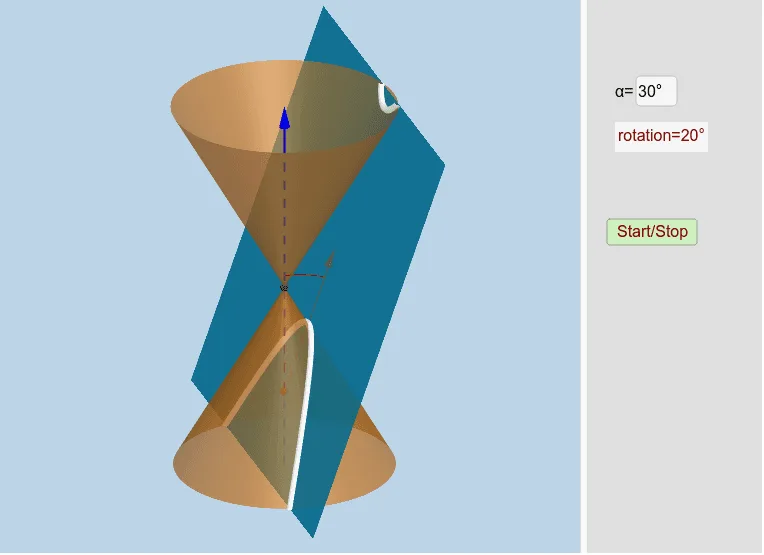
This example demonstrates how conic sections are formed when a plane intersects a cone at different orientations. By changing the relative position and angle of the intersecting plane, the construction reveals the resulting intersection curve (e.g., circle, ellipse, parabola, hyperbola) as a geometric object. The key math ideas are the definition of conics as the intersection of a plane with a conical surface and the way geometric parameters control the curve’s shape. Construction highlights include creating a 3D cone with InfiniteCone and a slicing Plane, then computing the intersection using Intersect/IntersectPath to obtain the conic curve. It also uses Vertex, Line, Ray, and Vector for reference geometry and directions; OrthogonalLine for perpendicular/auxiliary relationships; Circle and CircleArc for arcs in supporting constructions; Angle for measuring and displaying relevant angles; and Textfield for labeling parameters. Interactivity is driven by controls such as inputBox1/button1 and animation-related objects, with conditional logic (If) and optional symmetry (Mirror) to manage cases. Suitable for secondary to early university geometry instruction and interactive learning.
GeoGebra Commands & Parameters
OrthogonalLine(M, xOyPlane) → aPoint(a) → BLine(A, yAxis) → gCircle(A, 16, xAxis) → cIntersect(g, c) → X_1, JIntersect(zAxis, c) → Z_1, Z_2CircleArc(A, X_1, Z_1) → fPoint(f) → CCIf(j < 0, A + (0, (16 * cos(0)), (16 * sin(0))), If[j < π / 2 - α - 0.01, A + (0, (16 * cos(j)), (16 * sin(j))), If[j < π / 2 - α + 0.1, A + (0, (16 * cos(π / 2 - α)), (16 * sin(π / 2 - α))), If[j < π / 2 + 0.1, A + (0, (16 * cos(j - 0.1)), (16 * sin(j - 0.1))), If[j > π / 2 + 0.1, A + (0, (16 * cos(π / 2)), (16 * sin(π / 2)))]]]]) → XXIf(anim, XX, CC) → CPoint(zAxis) → HIntersect(zAxis, xAxis) → OLine(C, A) → dLine(A, B) → bPlane(d, b) → eMirror(H, xOyPlane) → H'Point(zAxis) → IInfiniteCone(O, H, α) → mIntersectPath(e, m) → pVertex(p) → D, E, F, GAngle(C, A, Z_1) → βCircleArc(A, C, Z_1) → hCircle(A, 20, xAxis) → kRay(A, C) → iIntersect(i, k) → K,Vector(A, K) → lTextfield(α) → inputBox1
AI Drawing Prompt Reference
Draw a conic section formed by the intersection of a cone and a plane. First, create a cone and then use a plane to intersect it. Change the plane's angle to get different conic sections such as ellipses, hyperbolas, or parabolas. Adjust the plane's angle to observe the changes in the conic section and label key points and angles.
The prompt above was compiled from the original drawing commands and is for reference only.